

Learning how to automate your tasks is all about finding those repetitive, mind-numbing activities you do every day and letting smart software handle them for you. It’s like hiring a digital assistant to take over the boring stuff, freeing you up to focus on work that actually requires your brainpower.
Your Starting Point for Task Automation
 If you feel like you’re drowning in a sea of small, repetitive jobs, you’re in the right place. A lot of people hear “automation” and immediately picture complicated code or giant corporate systems, but that’s not the reality anymore. At its core, automation is just about using clever tools to manage the monotonous parts of your day.
This guide cuts through the technical jargon and gets straight to the practical stuff you can use right away. The real goal here is to shift your thinking from a “do it myself” default to a “how can I get technology to do this for me?” mindset.
Identifying Your First Automation Wins
The best way to get started is to go after the “low-hanging fruit.” These are the simple, recurring tasks that eat up your time and energy but don’t require a lot of deep thinking. They make perfect candidates for your first successful automation.
Take a second to think about your daily and weekly routines, both at work and at home. What are the things you find yourself doing over and over again?
- Taming Your Inbox: Do you spend ages sorting emails? Set up a rule to automatically file messages from specific senders or with certain keywords.
- Running the Same Reports: If you pull data from the same sources every week for a standard report, that’s a prime candidate for automation.
- Managing Social Media: Instead of posting in real-time, schedule a whole week’s worth of content to go out at the perfect moments.
- Organizing Files: Automatically save email attachments to specific cloud folders based on the client or project name.
Starting with these easy wins helps you build momentum and see the benefits immediately. You don’t need to overhaul your entire life overnight. Just a few small, smart changes can add up to a ton of saved time. To see how powerful this can be, it’s worth checking out some real-world business process automation examples that show these efficiency gains in action.
To get your gears turning, here are a few common, high-impact tasks you could automate today.
Quick Wins Automation Ideas
Area of LifeTask ExamplePotential Time Saved Per WeekWorkAutomatically saving attachments from specific emails to a project folder in Google Drive.30-60 minutesPersonal FinanceGetting an SMS alert when a credit card transaction exceeds a set amount.15-20 minutesTeam CommunicationPosting a daily “Good Morning!” message with the day’s key priorities in a Slack channel.10 minutesHouseholdAutomatically adding staple items (like milk or coffee) to your grocery list every Friday.15-30 minutesThese are just a few ideas to show what’s possible with just a little bit of setup. Each one frees up a small slice of your time and mental energy, which really adds up.
Why Automation Skills Matter More Than Ever
Learning to automate isn’t just a neat trick for tech wizards anymore—it’s quickly becoming a core productivity skill for everyone. As more of our work and life moves online, automation has become a crucial tool for both individuals and companies trying to stay ahead.
The scale of this shift is massive. Investment in AI-powered automation has exploded, with U.S. companies alone spending $109.1 billion on AI. That’s about 12 times what China invested, showing just how critical automation is now seen for success.
This trend is showing up in our daily lives, too. The number of daily AI users around the world has tripled in just a few years. It’s clear that these tools have gone from niche applications to mainstream essentials.
Ultimately, learning to automate is about more than just clawing back a few minutes here and there. It’s about taking back your focus, clearing out the mental clutter, and making sure your valuable time is spent on the things that truly matter.
Finding and Prioritizing What to Automate
The secret to smart automation isn’t about automating everything—it’s about automating the right things. I’ve seen people jump in headfirst, only to build complex workflows that break constantly or “fix” problems that weren’t really problems to begin with.
The real goal is to be strategic. You want to focus your energy where it’s going to make the biggest difference, freeing up your time and mental space.
Before you can build anything, you need a clear target. This means taking a moment to look at your daily and weekly routines to find the best candidates for automation. A huge part of this is learning how to streamline business processes by spotting the little inefficiencies that add up. And trust me, this skill is just as valuable for your personal life as it is in the office.
Use the RRR Framework
A simple but incredibly effective way to vet tasks is what I call the ‘Repetition, Rules, and Return’ (RRR) framework. Think of it as a quick filter that helps you separate the gold from the duds.
Let’s break it down:
- Repetition: How often are you doing this task? The best things to automate are the ones that crop up on your to-do list every single day or week. We’re talking about things like copying data from one app to another, sending the same follow-up email, or renaming files. The more frequent it is, the more time you get back.
- Rules: Can you clearly explain how to do it? Automation runs on logic. If a task requires creativity, nuanced judgment, or a personal touch, it’s a poor fit. But if it follows a predictable “if this happens, then do that” pattern, you’ve found a winner.
- Return: What do you really get out of automating this? The payoff isn’t just about saving time. Think about the near-elimination of human error from manual data entry. Or the mental energy you reclaim by not having to remember that one tedious chore. It could even be the improved consistency in how your team communicates.
A task is ripe for automation if it’s highly repetitive, follows clear rules, and gives you a significant return on the time you invest in setting it up.
Auditing Your Daily Routines
Okay, time to put this framework into action. Grab a notebook or open a fresh document and just track what you do for a day or two. Don’t judge or filter—just write it all down, from checking emails to scheduling meetings. This little task audit is where you’ll find your automation goldmines.
With your list in hand, score each task against the RRR framework. A simple 1-5 scale for each of the three ‘R’s works perfectly.
Task ExampleRepetition (1-5)Rules (1-5)Return (1-5)Total ScoreSending weekly project update emails55414Brainstorming new blog post ideas1225Saving client invoices from email to Drive45514Manually updating CRM with new leads54514See how this scoring instantly clarifies your priorities? Those high-scoring tasks are where you should start. The “brainstorming” task, on the other hand, is a perfect example of what not to automate. It lacks repetition and clear rules; it’s a job for a human brain.
Building Your Priority List
Now that you have your scored list, you can create a real action plan. I always recommend starting with just one or two of the highest-scoring tasks. Trying to automate ten things at once is a surefire way to get overwhelmed—the very thing we’re trying to escape.
That feeling of having too much on your plate is a common struggle. In fact, our guide on how to stop being overwhelmed by tasks offers practical strategies that work hand-in-hand with automation.
Pick a first project that’s simple and low-risk. Success builds momentum and confidence. Automating something like a weekly report is a great first step because if it fails, the world doesn’t end—you just send it manually. This deliberate approach ensures that learning to automate becomes an empowering skill, not just another frustrating chore.
Designing Your First Automation Workflow
Alright, so you’ve pinpointed a task that’s ripe for automation. Now for the fun part: sketching out how it’s actually going to work. This is where you put on your “automator” hat and map out the entire sequence before you even open a tool. Think of it as creating a blueprint—it turns a fuzzy idea into a clear, step-by-step plan.
Every single automation, from the dead-simple to the ridiculously complex, is built on three core ideas. Get these down, and you can build just about anything.
The Three Pillars of Automation Workflows
These are the fundamental building blocks of any automated process.
- Triggers: This is the starting gun. A trigger is the specific event that kicks off your automation—the “if this happens…” part of the whole equation. A trigger could be anything from a new email landing in your inbox, a specific time of day (like 8 AM every Monday), a new row appearing in a spreadsheet, or even a customer submitting a form on your website.
- Actions: Once the trigger fires, what happens next? Those are your actions. They are the “then do that” instructions that get the work done. Actions are the real workhorses, doing things like creating a calendar event, firing off a message, updating a database, or saving a file to the cloud. You can have a single action or a whole chain of them.
- Connections: This is the digital glue holding everything together. A connection is what allows your different apps to talk to each other. It’s how your email app can tell your cloud storage to save an attachment, or how your project management tool can ping your team chat app. Without these integrations, your apps would be siloed, and nothing would happen.
The diagram below really simplifies the “why” behind this. It boils down the decision-making process to three key questions about Repetition, Rules, and Return. It’s a great mental framework for deciding which tasks are actually worth your time to automate.
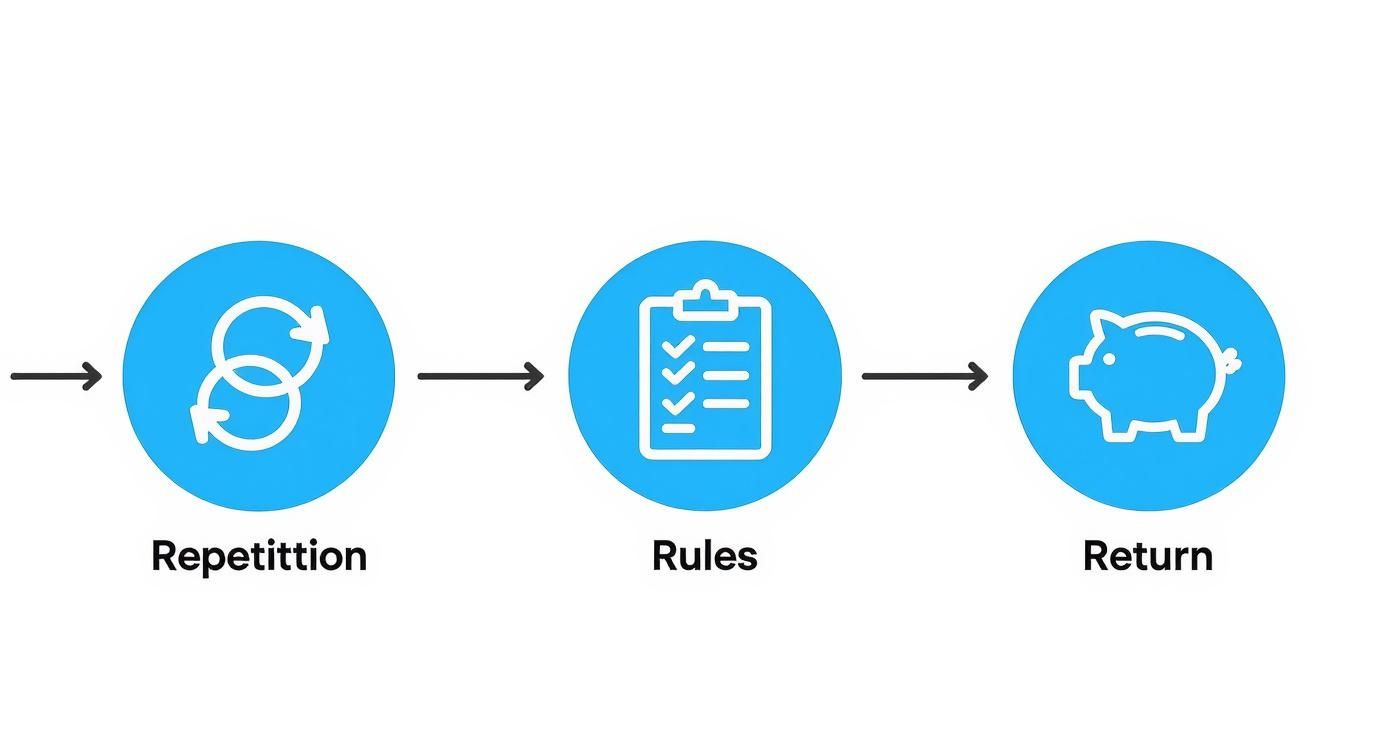 As you can see, the best candidates for automation are tasks that happen over and over, follow a predictable logic, and ultimately give you a worthwhile benefit.
Sketching Your First Workflow
Let’s walk through a real-world example to see how this works in practice. Imagine you’re constantly saving invoices that land in your email. It’s a simple task, but it adds up.
Here’s how you’d sketch out the automation:
- Define the Trigger: First, what starts it all? The workflow needs to begin when an email arrives in my inbox with the word “invoice” in the subject line. That’s a very specific, unambiguous event.
- Outline the Actions: What happens next? Once triggered, the workflow needs to scan the email for any attachments, then save that attachment to a Google Drive folder I’ve named “Client Invoices”. As a final step, it should send me a quick Slack notification that says “New invoice saved from [Sender Name].”
- Identify the Connections: To pull this off, you’d need to connect three different services: your email (like Gmail), your cloud storage (Google Drive), and your team chat (Slack).
This little sketch is your blueprint. It lays out the start, the middle, and the end without getting bogged down in the technical weeds just yet. Having this clear plan is what separates successful automations from frustrating dead-ends.
For instance, a lot of people start by automating recurring emails. If that’s on your list, you can see these same principles in action in our guide on how to automate sending emails.
Pro Tip: I always recommend grabbing a piece of paper or a whiteboard and literally drawing out the workflow. Mapping the trigger to each action visually helps you catch any gaps in your logic and often reveals ways to make the process even smarter.
Real-World Workflow Examples
Once you get the hang of the trigger-action-connection model, you’ll start seeing opportunities everywhere.
- For Your Team:
- Trigger: A task is marked “Complete” in Asana.
- Action 1: An update is automatically posted to the #project-updates channel in Slack.
- Action 2: A new row is added to a Google Sheet tracking all the work completed for the week.
- For Personal Productivity:
The trick is to start small and be specific. Once you master this simple design process with one or two tasks, you’ll have the confidence to build a whole library of automations that genuinely give you back your time.
Choosing the Right Automation Tools
Once you’ve mapped out your workflow, it’s time to pick your digital assistant. But with a sea of automation software out there, how do you choose? The secret isn’t finding the single “best” tool on the market—it’s finding the one that’s best for you.
Don’t get dazzled by a platform with a thousand features if all you need is a simple, reliable way to automate one or two things. The goal is to match the tool to the task, not the other way around.
Three Main Flavors of Automation Tools
Think of automation tools as falling into three main buckets. Figuring out which bucket you need will instantly narrow down your search.
- The Connectors (iPaaS): These are the jack-of-all-trades platforms. Tools like Zapier, Make (which you might remember as Integromat), and IFTTT act like digital glue, connecting thousands of different apps. They’re perfect for workflows that cross between services, like automatically saving email attachments to Dropbox or adding a new lead from a form to your CRM and a spreadsheet.
- The Specialists: Some tools are designed to do one thing exceptionally well. For example, if your primary goal is to automate email follow-ups, you’ll get more mileage out of one of the top tools to send recurring emails in 2024 than a general-purpose connector. These focused solutions are masters of their domain.
- The Built-Ins: You might already have powerful automation tools without realizing it. Check the software you use every day—your email client, project management app (like Asana or Trello), or CRM. Many have excellent native automations for tasks that happen entirely within their own ecosystem.
How to Make a Smart Choice
Instead of just grabbing the most popular tool, take a moment to think through a few key factors. This will help you pick a platform that works for you long-term, not one that creates more headaches.
Here’s what I always look at:
- Ease of Use: How quickly can you get up and running? A good tool shouldn’t feel like you need a degree in computer science. I always lean towards platforms with a visual, drag-and-drop builder—it makes creating a workflow feel more like sketching out an idea.
- App Integrations: This is a big one. Does the tool actually connect to the apps you rely on? Before you even start looking, jot down your must-have software (think Gmail, Slack, Google Calendar). Then, check if the platform has solid, reliable integrations for them.
- Pricing and Scalability: Most tools offer a free plan, which is fantastic for getting your feet wet. But think about the future. What happens when your needs grow? Make sure you understand how they charge—is it based on the number of automations you run, how often they check for new data, or something else entirely?
Choosing an automation tool is like picking a vehicle. You wouldn’t use a massive moving truck for a quick trip to the grocery store. Match the power and complexity of the tool to the scale of the task at hand.
Comparing Top Automation Platforms for Beginners
To help you get started, here’s a quick look at a few of the most popular and user-friendly platforms out there. This isn’t an exhaustive list, but it covers the go-to options for most people starting their automation journey.
ToolBest ForKey FeaturePricing ModelZapierBeginners needing wide app support and simplicity.An industry-leading library of over 5,000 app integrations makes it easy to connect almost anything.Freemium, with paid tiers based on the number of tasks and update frequency.**Make (Integromat)**Visual thinkers who want more control and complex logic.A powerful visual flowchart interface that lets you build multi-step, branching workflows.Freemium, with pricing based on the number of operations and data transfer.IFTTTSimple, personal, and smart home automations.“If This, Then That” applets are incredibly simple to set up for basic, single-step tasks.Free for a limited number of applets, with a Pro plan for more advanced features.Ultimately, the best way to find the right tool is to try a couple out. Sign up for the free tiers, build a simple automation, and see which interface feels most natural to you.
This widespread adoption of automation isn’t just a matter of personal convenience, either; it’s fundamentally changing how work gets done. The World Economic Forum projects that AI-driven automation will create 97 million new roles even as it displaces 85 million jobs.
With over 77% of manufacturing firms already using AI solutions, these skills are becoming essential across all industries. You can learn more about these AI adoption trends and what they mean for the future.
Building Reliable and Lasting Automations
 Getting your first automation up and running feels great, but the real magic comes when that workflow runs flawlessly in the background for months, or even years. The goal isn’t just to build an automation; it’s to build a dependable one. This is what separates a fragile script that needs constant hand-holding from a robust system you can actually trust.
Think of it like building a bridge. You wouldn’t just throw some planks over a gap and hope for the best. You’d test it, reinforce it, and make sure it can handle the stress. We need to apply that same mindset here.
The Power of Proactive Testing
Before you let your shiny new automation loose on your real work, you have to put it through its paces. And I mean really test it. Never, ever test with live, critical data. The last thing you want is a buggy workflow accidentally deleting important files or sending a half-finished email to your biggest client.
Create a safe sandbox for yourself. Use dummy accounts, sample spreadsheets, and fake contact info to run the entire process from start to finish. This is how you catch problems early and build real confidence in what you’ve built.
A few things I always check:
- Trigger Accuracy: Does it fire exactly when it’s supposed to? Try to break it. What happens if the trigger event is slightly different than you planned?
- Data Mapping: Is the information flowing correctly between your apps? Double-check that names, dates, and email addresses are landing in the right fields without getting jumbled.
- Conditional Logic: If your workflow has “if/then” steps, test every single path. Make sure the logic holds up and directs the task exactly where it needs to go under all conditions.
This initial testing phase is absolutely non-negotiable. It’s the single best thing you can do to prevent future headaches.
Maintaining Your Automations for the Long Haul
An automation is not a “set it and forget it” machine. Let me say that again. Apps get updated, APIs change, and your own processes will evolve. A workflow that’s perfect today might break three months from now for reasons totally out of your control. Long-term success means having systems in place to monitor and maintain what you create.
The most important thing you can do is set up failure notifications. Most automation platforms, like Zapier or Make, can send you an email or a Slack message the moment a workflow fails. This is your early warning system. It lets you jump in and fix things before they cause real disruption.
A broken automation you know about is a puzzle to be solved. A broken automation you don’t know about is a silent disaster waiting to happen. Always, always set up failure alerts.
Regular check-ins are also a good habit. I try to look at my most critical automations once a quarter. Are they still doing what I need them to do? Could they be more efficient? This simple review turns your automations from static scripts into living systems that actually get better over time.
A Simple Troubleshooting Checklist
When an automation inevitably fails—and it will—don’t panic. It’s usually one of a few common culprits. Running through a quick mental checklist can often solve the problem in just a few minutes.
- Check App Connections: This is the #1 cause of failure, hands down. Did you change a password recently? Did an app’s authorization expire? Reconnecting the app is almost always the first and easiest fix.
- Inspect the Trigger Data: Look at the specific data that caused the error. Was there a weird character in a name, a missing field, or an unusual date format that your workflow couldn’t process?
- Review Recent Changes: Did you tweak the workflow recently? Or did one of the connected apps just push a big update? Even small changes can have unintended consequences down the line.
The drive to build these kinds of reliable systems is part of a much bigger shift. The global artificial intelligence market, valued at around $184 billion, is expected to skyrocket to $826.7 billion by 2030. This incredible growth is fueled by the productivity gains that AI and automation bring to the table—the U.S. labor sector alone is projected to see a 35% productivity boost by 2035. You can dig deeper into AI adoption rates across different industries to see where things are headed. Adopting this mindset of building and maintaining automations isn’t just a useful skill; it’s preparing you for the future of work.
Got Questions About Automation? You’re Not Alone.
Jumping into automation for the first time can feel a little intimidating. It’s one of those things that seems way more complicated on the outside than it actually is. Let’s clear the air and tackle some of the most common questions and hesitations that pop up.
Do I Really Need to Be a Coder to Do This?
This is the number one myth that stops people in their tracks. The short answer? Absolutely not.
Sure, knowing how to code opens up a whole other level of customization, but the reality is that most of today’s best automation tools are built for everyone else. Platforms like Zapier, Make, and IFTTT are what we call “no-code” or “low-code.” They use visual, drag-and-drop editors that feel more like building with digital LEGOs than writing complex scripts. You connect your apps, set simple rules from dropdown menus, and build powerful workflows without ever touching a line of code.
Okay, So What Should I Automate First?
When you’re just starting, momentum is key. You want a quick win that makes you say, “Wow, that was easy, and it actually saved me time.” The best way to get there is to start small and simple.
Look for tasks with these three traits:
- Highly Repetitive: Think about the stuff you do every single day or week, like clockwork. Renaming files, saving email attachments, or copying data from one app to another are prime candidates.
- Rule-Based: The task needs to follow a clear, predictable pattern. It should be pure “if this happens, then do that” logic, with no creative thinking or judgment calls needed.
- Low Stakes: This one is important. Your first automation shouldn’t be a mission-critical process. Choose something that, if it breaks, is no big deal. A failed internal report can be run manually; a failed client billing process is a much bigger headache.
Once you nail a few of these simple automations, you’ll build the confidence and skills to tackle more complex, high-impact workflows.
How Do I Make Sure My Automations Are Secure?
This is a fantastic and crucial question. Anytime you’re connecting apps and giving them permission to access your data, you should be thinking about security. The good news is that reputable platforms are obsessed with it.
First off, stick with the big, well-known players in the automation space. They have entire teams dedicated to security and a reputation to protect. When you connect your accounts, always use strong, unique passwords and—I can’t stress this enough—enable two-factor authentication (2FA) everywhere it’s offered.
Also, be mindful of the permissions you grant. A great practice is the “principle of least privilege.” This just means you only give an app the minimum access it needs to do its job. Don’t give it permission to read and write all your files if it only needs to add a new row to a specific spreadsheet. For anything involving sensitive financial or personal health information, it’s worth looking into enterprise-grade tools that come with specific compliance certifications.
What’s the Real Difference Between Automation and AI?
It’s easy to see why these two get mixed up—they’re often talked about in the same breath. But they play two very different, complementary roles.
Automation is the worker. It follows a strict set of pre-defined instructions you give it.
Artificial Intelligence (AI) is the thinker. It interprets unstructured information and makes decisions.
Let’s make this real. A classic automation would be: “When an email arrives with ‘Invoice’ in the subject, save the attachment to my Google Drive ‘Invoices’ folder.” It’s a simple, direct command.
Now, let’s bring in AI. The new workflow could be: “When an email with an invoice arrives, have an AI read the attachment, pull out the client’s name, the total amount, and the due date. Then, the automation will use that info to rename the file, move it to the correct client’s subfolder, and add a reminder to my calendar for the due date.”
See the difference? Automation does the moving, but AI does the understanding. Together, they create seriously smart systems.
Stop letting repetitive tasks drain your time and energy. With Recurrr, you can put your routine work on autopilot, from sending recurring emails to managing daily checklists. Our intuitive platform makes it simple to build reliable automations that give you more time to focus on what truly matters. Start automating with Recurrr today and reclaim your day.