

Staying organized at work isn't about perfectly aligned desk toys or color-coded everything. It’s about creating simple, repeatable systems for your tasks, time, and information so you can stop putting out fires and actually get things done.
Think of it as building a reliable engine that runs in the background, freeing you up to focus on the work that truly matters instead of constantly scrambling to figure out what's next.
Why Getting Organized at Work Actually Matters
Let's be honest, "getting organized" often sounds like just another chore on an already overflowing to-do list. But what if it's the one thing that could actually clear that list for good? The truth is, disorganization is more than a minor inconvenience—it's a silent killer of your focus, energy, and even your professional growth.
Every moment spent hunting for a file, deciphering a chaotic inbox, or trying to recall a verbal instruction is a moment you're not spending on high-impact work. These little instances of chaos quickly snowball, eating up hours every single week.
The Four Pillars of Workplace Organization
Before we dive deep, here's a quick look at the core concepts we'll cover. This gives you a roadmap for the practical systems we're about to build.
PillarCore PrincipleKey BenefitSystemize Your TasksCreate a single source of truth for all incoming work and to-dos.Eliminates mental clutter and the fear of forgetting something important.Master Your TimeProactively block out time for your priorities instead of reacting to your calendar.Gives you control over your day and protects your deep work time.Tame Your InformationDevelop a simple method for capturing, storing, and retrieving information.Reduces time spent searching and ensures you can find what you need, when you need it.Optimize Your EnvironmentDesign your physical and digital workspaces to minimize friction and distractions.Creates an environment where focus is the default, not a struggle.Each of these pillars supports the others, creating a comprehensive framework that turns chaos into clarity.
The Hidden Costs of Workplace Chaos
Disorganization creates a constant state of low-level stress. It’s a tax on your brainpower. Think about the daily interruptions. Research shows employees get interrupted about every three minutes, and it takes a staggering 23 minutes to fully recover your focus after each one. A messy workflow amplifies this, turning every small question or search for a document into a major focus-breaking event.
This constant context-switching is a huge reason so many of us feel busy all day but not productive.
The cumulative effect is enormous.
Workplace studies have found that only 21% of employees are truly engaged at work, with disorganization being a massive driver of this disconnect. This widespread lack of engagement is estimated to cost the global economy a mind-boggling US$438 billion in lost productivity every year.
From Feeling Overwhelmed to Taking Control
When your systems are clear, your mind is free. You can solve problems, think creatively, and perform at your best. A truly organized approach helps you:
- Reduce Decision Fatigue: You already know your priorities, so you stop wasting mental energy just figuring out what to do next.
- Build Professional Trust: When you consistently hit deadlines and manage your responsibilities, colleagues and clients see you as reliable and competent. It’s that simple.
- Reclaim Your Time: You stop reacting to the day and start directing it. This gives you back control over your schedule and your workload.
This isn't about achieving some rigid, flawless system. It’s about building a strategic advantage that puts you back in the driver's seat. It's the first step to stop being overwhelmed by tasks and sets the stage for the practical frameworks we’ll build together in the rest of this guide.
Building Your Personal Organization System
Let's be honest: there's no magic app or one-size-fits-all method for staying organized at work. The hyper-detailed system your coworker raves about might feel like a straitjacket to you. The key is to stop chasing trendy solutions and instead build a simple, sustainable system that actually fits your workflow and personality.
Think of it as creating your personal command center. This isn't about achieving organizational perfection; it's about building a reliable system you can trust. Before you even think about downloading another app, you need to do a personal audit to figure out what's really broken.
Identify Your Biggest Friction Points
Getting organized always starts with some honest self-assessment. Where does the chaos creep in? Pinpointing your specific pain points is the single most important step, because it makes sure you’re solving the right problems, not just copying someone else's solution.
Where do you feel the most friction? It's usually in one of these areas:
- The Anxious Inbox: Is your email a constant source of stress? If you're missing important messages, forgetting to reply, or worse, using your inbox as a dumping ground for to-dos, that's a major red flag.
- The Digital Graveyard: Be real—could you find a specific file from three months ago in under 30 seconds? If your desktop and cloud storage are a chaotic mess of "Untitled (1)" documents and random folders, you're bleeding time and mental energy.
- The Endless Task List: Do you have tasks scattered across sticky notes, a paper notebook, and three different digital apps? When your to-dos aren't centralized, it’s flat-out impossible to prioritize, which just leads to feeling overwhelmed.
- The "I'll Remember That" Trap: Are you still relying on your brain to track important details, follow-ups, and deadlines? I've been there. It’s a surefire recipe for dropping the ball and missing opportunities.
Just by identifying your top one or two friction points, you can focus your energy where it'll make the biggest difference.
Choose Your Core Tools Wisely
Once you know what's causing the most pain, you can pick a few simple tools to fix it. The goal here is minimalism, not complexity. You don't need a heavy-duty project management suite if your main problem is just keeping track of personal deadlines.
Your organizational system should serve you, not the other way around. If a tool requires more time to manage than the time it saves, it’s the wrong tool for the job.
Most of us can get by with a "Core Three" stack to manage our workflow effectively:
- A Calendar: This is for anything with a hard date and time. It’s non-negotiable. Your calendar should be the single source of truth for all appointments, meetings, and hard deadlines.
- A Task Manager: This is for everything you need to do. Whether it’s a simple app like Todoist, a physical notebook, or a more robust platform like Asana, this needs to be the one and only place where all your action items live.
- A Note-Taking App: This is for capturing raw information—ideas, meeting notes, project specs. A tool like Notion, Evernote, or even a simple text file keeps reference material out of your task manager and inbox, where it doesn't belong.
Don't overcomplicate this part. The best tool is always the one you'll actually use consistently. If you're looking to expand your toolkit later, exploring some of the best personal productivity apps can help you find the right fit without adding a bunch of clutter.
The True Cost of Micro-Distractions
Why is building a system so critical? Because the cost of disorganization is paid in tiny, focus-shattering moments. Every time you have to search for a file, remember a task, or figure out what to do next, you’re creating a micro-interruption that pulls you out of deep work.
This is the hidden cost of chaos—a single, tiny interruption snowballs into a significant loss of focused time.
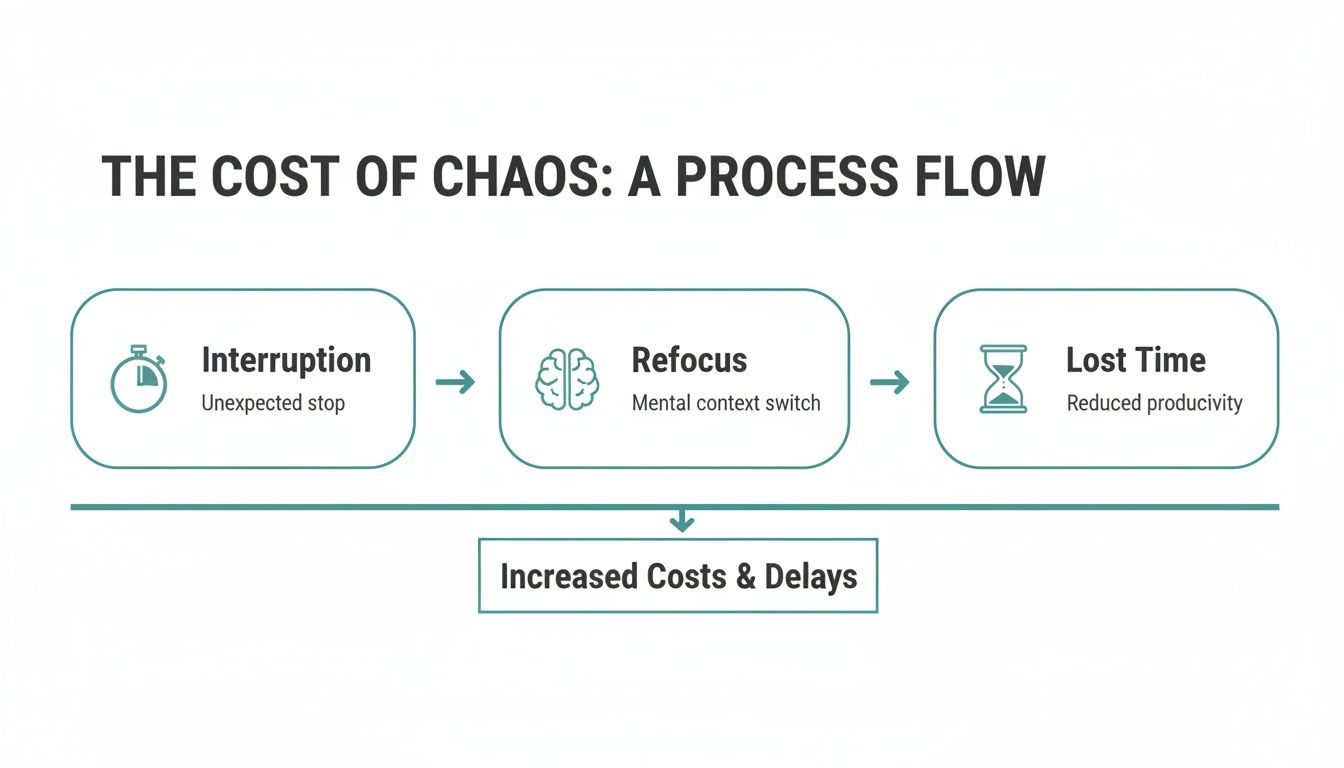 The real damage isn't the interruption itself. It’s the lengthy "refocus" period it takes to get back on track, which research shows can take up to 23 minutes.
A solid personal organization system acts as a shield against these interruptions. To make organization truly stick, you can take it a step further by building a comprehensive personal operating system designed for your unique needs. This approach integrates your tools and habits into a cohesive whole, turning reactive chaos into proactive control so you can stay organized for the long haul.
Mastering Your Daily and Weekly Routines
All the best tools in the world won't help you if you don't build the habits to use them. This is where the rubber meets the road—turning your organizational system into something that runs on muscle memory. The real secret to staying organized isn't some complex methodology; it's about creating simple, repeatable routines that free up your brainpower for the hard stuff.
Think of it as bookending your day. You need an intentional start and a deliberate finish. These moments are your defense against the constant pull of your inbox, letting you set the agenda instead of just reacting to it.
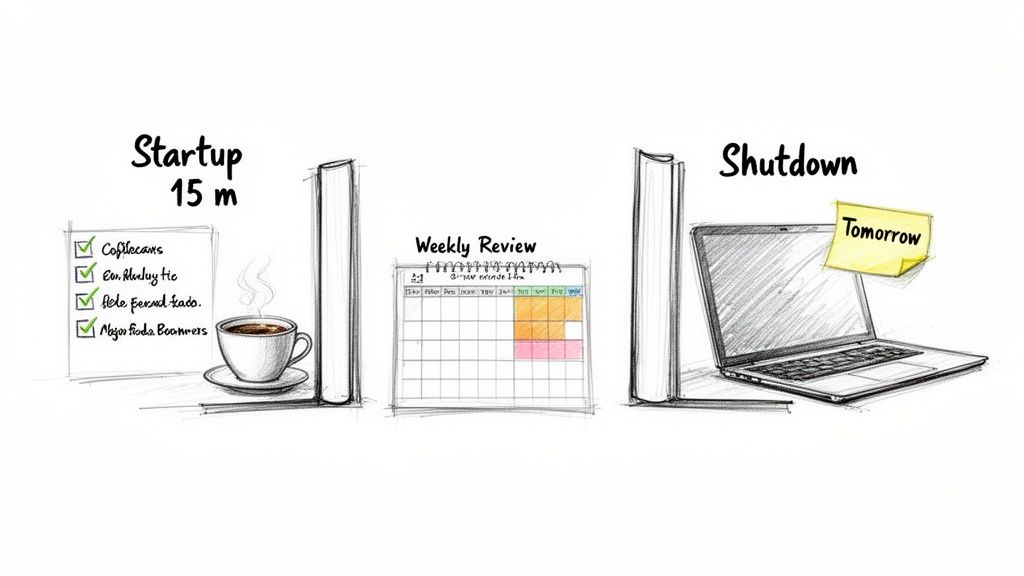 ### Design Your 15-Minute Startup Ritual
How you kick off your morning can make or break your entire day. Instead of immediately diving headfirst into the chaos of email—which instantly throws you into a reactive state—carve out just 15 minutes for yourself. This little buffer is a total game-changer.
Your startup ritual doesn't need to be fancy. In fact, simple is way more effective. The whole point is to answer one question: "What does a win look like today?"
Here’s a simple but powerful way to structure it:
- Two-Minute Tidy: Clear your desk of yesterday's coffee mugs and clutter. A clean physical space does wonders for your mental space.
- Calendar Scan: Glance at your meetings and appointments. This lets you mentally prep for the day's commitments and see where your blocks of focus time are.
- Priorities Check: Look at the to-do list you prepped last night. Pinpoint your top 1-3 priorities—the tasks that will actually move the needle.
This quick, intentional start stops the day from steamrolling you. You begin with a clear purpose, not a sense of dread from an overflowing inbox. If you want to get serious about this, exploring some of the best daily routine apps can help lock these habits in.
Prioritize Your Tasks with the Eisenhower Matrix
Okay, so you know what's on your list. Now what? Staring at a massive to-do list is paralyzing. This is where a classic framework like the Eisenhower Matrix is so helpful. It’s a simple grid that helps you sort tasks by urgency and importance.
It forces you to categorize everything into four boxes:
QuadrantDescriptionActionExampleUrgent & ImportantThe fires and tasks with real, immediate deadlines.DoThat client report is due at 3 PM.Not Urgent & ImportantThe high-value stuff: strategic planning, skill development, relationship building.Decide/ScheduleBlock time next week to plan the Q3 marketing strategy.Urgent & Not ImportantMost interruptions, some emails, other people's priorities.DelegateHandle a quick, non-critical query for a teammate.Not Urgent & Not ImportantThe time-wasters, mindless scrolling, and busywork.DeleteScrolling through your social media feed.Using this matrix is about shifting from reacting to what’s screaming the loudest to focusing on what truly matters. It ensures your best energy goes toward things that build long-term success, not just dousing the latest fire.
The secret to productivity isn't about doing more things; it's about consistently doing the right things. The Eisenhower Matrix is a powerful tool for making sure your daily actions align with your bigger goals.
The Game-Changing Weekly Review
If the daily startup is about winning the day, the Weekly Review is about winning the week. This is your appointment with yourself—usually 30-60 minutes on a Friday afternoon—to zoom out, process everything, and plan the week ahead. Honestly, it might be the single most impactful habit you can build.
This practice is your guarantee that things don't fall through the cracks and you can walk in on Monday morning knowing exactly what you need to do.
I like to break my Weekly Review into three parts:
- Get Clear: First, look back. What did you accomplish? Review your calendar, notes, and completed tasks. What worked? What didn't? Dump any loose thoughts or new ideas into your inbox.
- Get Current: Now, process it all. Triage your inboxes (email, physical, and digital) down to zero. Drag new tasks into your to-do list and organize your notes. You're aiming for a clean slate.
- Get Creative: Finally, look forward. Check next week's calendar and review your bigger goals. What are the most important things you need to accomplish? Block time for them now, treating them like can't-miss meetings.
This one habit is the ultimate antidote to overwhelm. By consistently clearing the decks and planning ahead, you make sure you’re not just staying busy, but being truly effective.
Perfect Your End-of-Day Shutdown
Just as you start your day with intention, you need to end it the same way. A solid shutdown routine tells your brain the workday is officially done, allowing you to properly disconnect and recharge. Without it, work thoughts tend to bleed into your evening.
This only takes 5-10 minutes but the payoff is huge.
- Check off what you finished today.
- Move any incomplete items to tomorrow's list and pick your top priorities.
- Close out all your work-related tabs and apps. Seriously, all of them.
- Give your desk a quick tidy for a fresh start.
This simple act of "closing the loops" helps you leave the office—even if it's just the corner of your dining room—feeling a sense of accomplishment and clarity. You'll know exactly where to pick up tomorrow, which is the foundation of staying organized day after day.
Using Automation to Handle Repetitive Work
Even with the tightest routines, our focus is constantly under attack. The biggest culprit isn't always a huge, unexpected project. More often, it's the little things.
Think about the small, repetitive tasks that chip away at your mental energy all day long. Sending that same follow-up email, reminding a client about an invoice, or chasing down your team for their weekly status update. Individually, they're tiny. But together, they create a constant hum of low-level admin work that pulls you away from the deep, meaningful projects that actually matter.
This is where a little bit of smart automation can completely change the game. We're not talking about overhauling your entire workflow with complex, expensive software. Instead, it’s about pinpointing those small, recurring tasks and letting technology handle them for you. The goal is simple: offload the monotonous work so you can reclaim your focus for creative and strategic thinking.
The Power of Small Productivity Hacks
When people hear "automation," they often imagine giant, complicated systems. But honestly, some of the most powerful solutions are small, almost invisible tools that just work quietly in the background. They aren’t meant to replace your main task manager or project management suite. They supplement them by handling very specific, recurring jobs.
This is where a hidden gem like Recurrr comes into play. Think of it less as a massive new system to learn and more like a small productivity hack you can add to your existing toolkit. Its sole purpose is to automate recurring emails—a surprisingly common source of mental clutter for just about any professional.
By setting up these communications to run on autopilot, you remove them from your daily to-do list and your mind. You no longer have to remember to send that weekly report or chase down that monthly payment. The system just handles it, and you get back priceless time and attention.
Putting Automation into Practice with Recurrr
The best way to see the impact is to look at real-world scenarios. These aren't just abstract ideas; they are practical setups you can implement in a few minutes to start saving time immediately. For a deeper dive, our guide on how to automate repetitive tasks at work has even more ideas.
Let's walk through a few concrete examples of how you can use a simple tool to take routine communications completely off your plate.
Below are a few common work scenarios and how you could set them up in Recurrr to run automatically.
Sample Automation Rules with Recurrr
TaskRecipientFrequencyRecurrr Setup ExampleWeekly Report SubmissionYour ManagerEvery Friday at 4 PMSet an email to send with your attached report and a summary of the week's progress.Monthly Invoice ReminderA ClientThe 25th of every monthSchedule a friendly reminder about the upcoming due date for their invoice.Daily Team Check-inYour Direct ReportsEvery morning at 9 AMAutomate a prompt asking the team to share their top priority for the day in your chat channel.Client Onboarding Follow-upNew Client3 days after kickoffSend a pre-written email checking in, offering support, and linking to helpful resources.Each of these examples represents a small mental load that, once automated, is gone for good. You're making a simple but powerful shift from doing the task to designing a system that does the task for you.
Reclaiming Hours Every Week
This strategy isn't just about convenience; it has a real, measurable impact on your effectiveness. The latest data shows a clear link between automation and productivity. According to a 2025 compilation of employee productivity statistics, a staggering 77% of employees believe automating routine tasks would improve their performance.
Even better, global workers who already use automation are saving an average of 3.6 hours per week. That's almost half a workday back in your pocket, every single week.
The data also reveals that the most productive people are 242% more likely to use AI and automation than their less productive peers. This highlights a critical insight: top performers aren't just working harder; they're working smarter by offloading repeatable work to technology. You can discover more insights about employee productivity statistics to see the full picture.
By embracing these small automation hacks, you join the ranks of those who are strategically reclaiming their time. It’s about investing your best energy into the complex, creative, and high-impact work that only you can do.
Designing Your Physical and Digital Workspaces
Let's be honest, your ability to stay organized is directly tied to the spaces you work in. A messy desk or a desktop wallpaper you can't even see anymore isn't just an aesthetic problem. It's a constant, low-level distraction that slowly drains your focus and mental energy all day long.
Getting your workspaces in order is a foundational step. This isn't about chasing a Pinterest-perfect office. It’s about removing friction. It's about creating an environment where deep work is the default state, not something you have to fight for. When your spaces are set up right, you stop wasting time looking for things and start spending that time actually doing things.
 ### Creating a Frictionless Physical Workspace
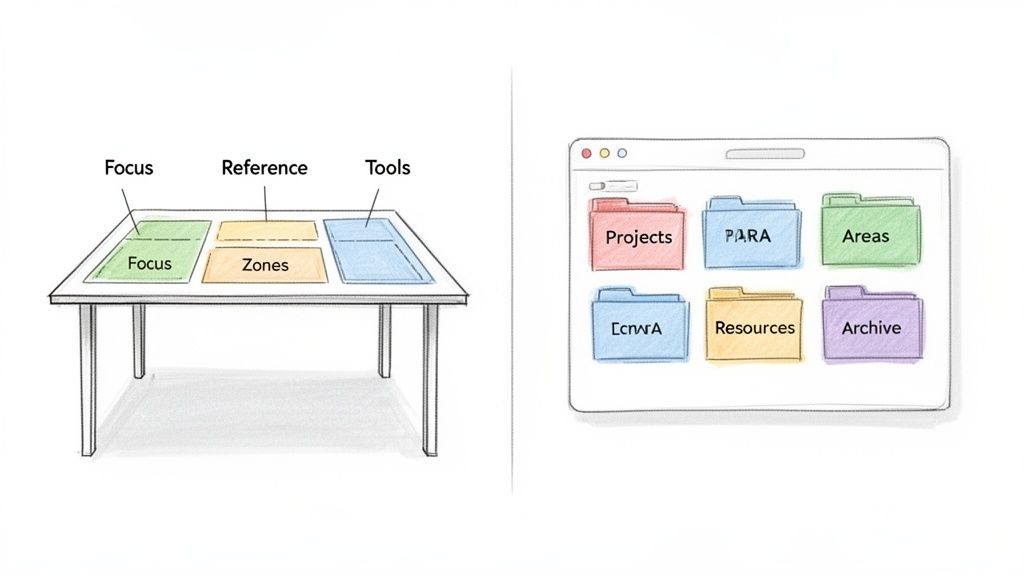
Think of your physical desk as a tool for getting things done, not as a storage unit for random clutter. The secret is to think in zones, making sure everything has a home and is within reach based on how often you actually use it. This simple shift keeps your immediate workspace clear and lets your brain focus on what matters.
Try carving out these areas on your desk:
- The Focus Zone: This is your prime real estate—keyboard, monitor, mouse. Keep this area as clear as humanly possible to kill visual distractions.
- The Active Zone: This is anything within arm's reach. It's for the stuff you use daily, like a notebook, your favorite pen, and a water bottle.
- The Reference Zone: A little further out, this is for items you need but not constantly. Think reference books, a stapler, maybe your planner.
Anything that doesn't fit into these zones needs to find a new home off your desk. Beyond the desk itself, really digging into how to organize a home office for peak productivity can completely change your relationship with your work environment.
Taming Your Digital Environment
A chaotic digital workspace is just as bad as a messy physical one. Here’s a simple test: if you can't find a file in under 30 seconds, your system is broken. The goal is to build a simple, logical structure that minimizes search time and maximizes doing time.
One of the most effective frameworks I've come across is the PARA method. It organizes all your digital information into four main folders:
Folder NamePurposeWhat Goes InsideProjectsShort-term efforts you're actively working on with a specific goal.A new client proposal, a report due this month, planning a team offsite.AreasLong-term responsibilities or interests with no end date."Marketing," "Finances," "Personal Development," "Client Management."ResourcesTopics of ongoing interest or reference materials.Articles on a new skill, design inspiration, useful code snippets, templates.ArchiveInactive items from the other three categories.Completed projects, old reference materials, anything no longer active.The beauty of this system is that it's based on action. You instantly know where to save something new and exactly where to find something old.
The point of any digital organization system is to make finding things completely effortless. PARA does this by sorting information based on how and when you'll need it, turning your file system into a second brain you can actually rely on.
Establishing a Simple File-Naming Convention
To make that new folder structure even more bulletproof, you need a consistent file-naming convention. This makes your files sortable and searchable, saving you from the dreaded task of opening five different "Final Report" documents to find the right one.
A simple format that works wonders is:
YYYY-MM-DD – Project Name – Description – vX
For example:
2024-10-26 - Q4 Marketing Report - Final Draft - v3.docx2024-11-05 - Acme Co Proposal - Client Feedback - v1.pdf
This system automatically sorts your files by date, and a quick glance tells you everything you need to know. When you combine a clean folder structure with a smart naming convention, your digital workspace starts working for you, making it easier than ever to find what you need, right when you need it.
Questions You'll Probably Have About Staying Organized
Look, getting a new system in place is a fantastic start. But the real test? Making it stick when work gets messy. It's totally normal to hit a few bumps in the road. Think of this as your field guide for the most common issues that crop up.
Working through these will help you fine-tune your approach, stay resilient, and keep that hard-won organizational clarity for the long haul.
"My System Feels Like a Second Job. What Gives?"
This is a classic. If you're spending more time managing your organization system than actually doing your work, you've over-engineered it. The whole point is to make things easier, not add another layer of complexity.
Time for a reset. Go back to the absolute basics for one week. Use only your "Core Three": your calendar, one task manager, and one simple notes app. Ditch all the fancy tags, elaborate folder trees, and niche apps you’ve bolted on.
This little experiment is incredibly revealing. You'll quickly see what's truly essential and what was just noise.
The best organizational system is the one that gets out of your way. Its job is to free up your brainpower for what matters, not become another thing to manage.
"I Had a Crazy Week and Everything Fell Apart. How Do I Get Back on Track?"
We've all been there. A project explodes, your routines go out the window, and now your inbox and to-do list look like a crime scene. Don't panic and definitely don't abandon ship. The answer is to schedule a "reset session."
Block off 60-90 minutes on your calendar. First thing Monday morning is perfect. Treat this appointment with yourself as sacred. During this time, you’re going to run an emergency version of your weekly review.
- Get It All Out: Dump every single task, worry, and open question from your head into your task manager's inbox. Don't sort it. Just get it out.
- Clear the Decks: Process your inboxes—email, physical mail, task inbox—down to zero. Delete ruthlessly, delegate what you can, and turn what's left into actual, defined tasks.
- Plan Only the Next 24 Hours: Forget the whole week. Just identify the 1-3 absolute most critical things you need to get done tomorrow to feel like you're back in the driver's seat.
This focused blitz cuts through the feeling of being completely overwhelmed. It gives you a small, solid piece of ground to stand on so you can start moving forward again.
"How Am I Supposed to Handle Unexpected Tasks That Wreck My Plan?"
No plan survives contact with reality. "Urgent" tasks will always pop up and threaten to blow up your perfectly planned day. The biggest mistake is to drop everything and immediately jump on the new request. That's how you end up living in a constant state of reaction.
Instead, get into the habit of the "Capture and Clarify" method.
When a new task lands on your plate, don't just do it. Take 30 seconds to capture it in your task manager. Then, ask a couple of simple questions: "When do you actually need this by?" or "What does a finished version of this look like?" You'll be surprised how often "urgent" really means "sometime this week."
This tiny pause gives you the space to weigh the new task against your current priorities. You can then make a conscious choice—tackle it now, schedule it for later, or pass it off—instead of letting your day get hijacked.
Staying organized isn't a one-and-done project; it's a practice. For all those small, repeatable tasks that consistently clog up your to-do list, automation is your best friend. With Recurrr, you can set up recurring emails for reports, reminders, and follow-ups in just a few minutes. Stop managing the small stuff and free up your focus for what really matters. Learn more about how Recurrr can put your routines on autopilot today.