

Auto email reminders are exactly what they sound like: pre-written messages that you set up once to send automatically on a schedule you define. Think of it as your own personal assistant, one that takes over the mundane job of remembering to send routine messages so you don't have to.
This simple bit of automation can be a huge boost for anyone, whether you're trying to manage your personal life, run a household, or keep a small team on track.
Why Auto Email Reminders Are a Productivity Game Changer
Let's be honest, manual follow-ups are a total drag on your time and focus. Every second you spend typing out another "just checking in" email is a second you could've spent on work that actually matters. This is where automated reminders go from being just a neat tool to a full-blown productivity system.
Consider all the repeating messages you send. Client check-ins, rent reminders, project prompts for your team—each one chips away at your mental energy. By setting them on autopilot, you build an intelligent system that just works, making sure nothing important gets missed.
The Power of Invisible Tools
You don't always need some massive, all-in-one platform to fix a specific problem. In my experience, the best solutions are often small, focused, and almost invisible. They're the kind of tools that slide right into your current workflow without making you learn a whole new, complicated system.
This "invisible tool" concept is where an app like Recurrr really nails it. It’s a small but mighty productivity hack built to do one thing perfectly: send recurring emails. It’s not trying to be your project manager or habit tracker. It's a hidden gem that works alongside the tools you already love.
This approach has some serious perks:
- Less mental clutter: You set it up once and it just runs. Your brain is free to focus on bigger things.
- Perfect consistency: Reminders go out on schedule, every single time. No more relying on your own memory.
- Proactive, not reactive: You stop chasing people for updates and start managing your schedule and relationships ahead of time.
- Effortless to use: These tools work with your existing email, adding zero complexity to your day.
Turning Automation into a Real Asset
This isn't just a feeling; the numbers back it up. By 2026, the world is expected to send a staggering 392.5 billion emails every single day. Automated emails consistently blow standard campaigns out of the water, with open rates hitting 38% to 42.1%.
For small teams and professionals, these simple automations might only make up 2% of their total emails sent, but they can drive 30% of revenue. That's a massive impact. And with delivery rates close to 99%, it's a super reliable way to get your message seen. You can find more of these eye-opening stats over at Omnisend.
Ultimately, the key is to see these reminders as a proactive system, not a reactive chore. They aren't about nagging people. They’re about creating a dependable framework that supports your goals, strengthens relationships, and protects your most valuable resource—your attention. For a deeper look, check out our guide on the benefits of using automatic reminders.
Choosing the Right Tool for Your Automated Reminders
Picking the right software for your auto email reminders can feel like a chore. But it really just comes down to one simple question: does it fit into how you already work, or does it make you learn a whole new system?
Lots of big platforms—think CRMs or project management suites—tack on reminder features. The problem is, they're often buried under layers of other stuff you don't need. If you're already living and breathing inside that ecosystem, great. But if you just need a simple, reliable way to send recurring messages without all the extra baggage, a dedicated tool is almost always the better choice.
The goal is to solve your problem with the least amount of fuss.
Dedicated Tools vs. All-In-One Platforms
When you're weighing your options, think about the trade-offs. An all-in-one platform keeps everything in one place, but it can be like using a sledgehammer to crack a nut. A dedicated tool, on the other hand, is simple and focused, but it does mean adding another app to your tech stack.
Top 5 Tools for Auto Email Reminders
To help you decide what's right for you, here’s a quick look at five great options that excel at sending automated reminders. Each has its own strengths, but all are focused on getting the job done efficiently.
| Tool | Best For | Key Feature |
|---|---|---|
| Recurrr | Individuals & Small Teams | Simplicity and direct Gmail/Outlook integration. |
| Boomerang | Gmail Power Users | Send later, inbox pausing, and response tracking. |
| FollowUpThen | Minimalists | Email-based commands; no software to install. |
| Right Inbox | Sales & Outreach | Advanced tracking and CRM integration features. |
| Zapier | Ultimate Customization | Connecting email to thousands of other apps. |
For a lot of people, the simplicity of a focused app just makes more sense. If you want to see what's out there, this guide to the best workflow automation tools is a great place to start your search.
Finding a Hidden Gem That Just Works
Sometimes the best solution isn't some massive, all-encompassing platform. It's the small, invisible tool that just hums along in the background, doing its job perfectly without you having to think about it.
That's the whole philosophy behind Recurrr. It was built to be a simple productivity hack, not a beast of a system that tries to run your entire life.
Its real value is in its simplicity and its laser focus on doing one thing exceptionally well: sending recurring emails from your existing account without any fuss.
The most effective tools don't demand your constant attention. They work so well that you almost forget they're there, freeing up your mental space for more important work. This is the essence of a truly great productivity hack.
And don't forget the tools you already use every day. Platforms like Google Calendar can be a powerful foundation for your workflow. You can really level up its usefulness with things like time tracking with Google Calendar. By pairing a simple scheduler you're already familiar with and a dedicated reminder tool, you build a powerful, lightweight system that slips right into your existing routine.
Crafting Reminder Emails People Actually Read
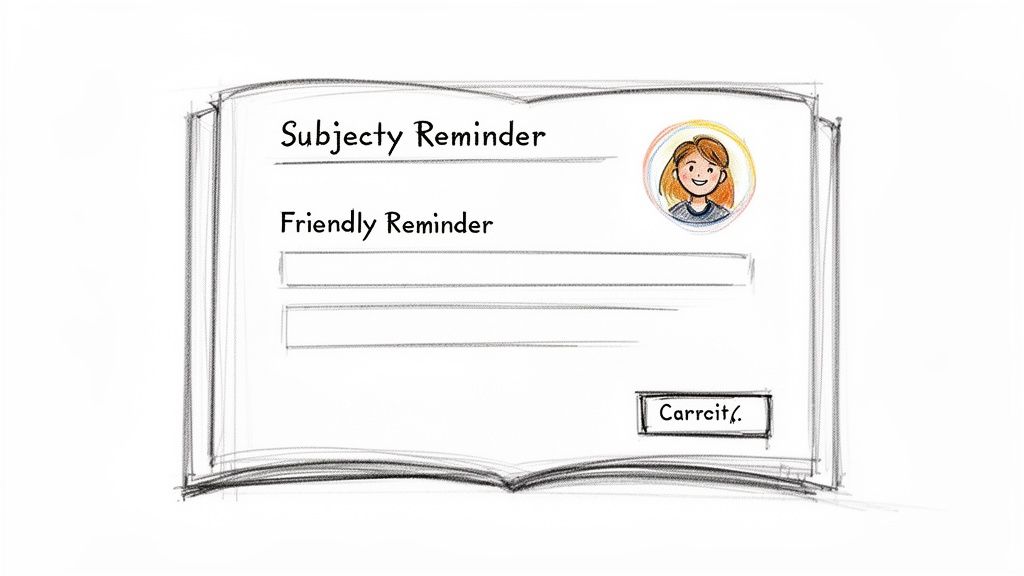
Let's be honest: an automated reminder is completely useless if it gets ignored. The line between a helpful nudge and an email that’s instantly deleted is surprisingly thin, and it all comes down to one thing: making it feel human. The best auto email reminders cut through the inbox noise because they are clear, concise, and considerate.
Your first battle is the subject line. The goal is to create a sense of importance without triggering anxiety. Vague subjects like "Reminder" are just too easy to scroll past, while something aggressive like "ACTION REQUIRED: Payment Overdue" can feel hostile right out of the gate.
A much better way to go is to be specific and friendly. Something like "Friendly Reminder: Team Project Sync This Friday" tells the recipient everything they need to know before they even open the email.
Make it Personal, Make it Stick
Generic, robotic language is the fastest way to get your email ignored. Real personalization is about more than just plugging in a [First Name] tag; it’s about acknowledging the context of the reminder. A small, thoughtful touch can completely change how your message lands.
When you get this right, you tap into some powerful habits. Globally, 60% of consumers prefer to be contacted by businesses via email. A staggering 93% of people check their inbox daily, and for 58%, it's the very first thing they do in the morning. Emails with personalized subject lines even see 26% higher open rates. It just goes to show that a little effort makes a huge difference.
By crafting reminders that don't feel intrusive, you avoid adding to inbox stress—a real problem for 59% of people. That alone makes your message far more likely to be seen and acted upon. You can dig into more stats about how people engage with email marketing on webtoffee.com.
A great reminder email gives the recipient everything they need up front. They should know what’s needed, when it's needed, and what to do next without having to hunt through old messages.
Real-World Reminder Examples
Let's break down a few scenarios to see how tone and clarity work in the wild.
1. The Friendly Rent Reminder
- Subject: A Friendly Reminder: Rent for [Month] is due soon
- Body: Hi [Tenant Name], just a quick and friendly reminder that your rent payment of [Amount] for [Property Address] is due on [Date]. You can find payment options here: [Link]. Thanks for being a great tenant!
2. The Weekly Team Check-In
- Subject: Quick Check-In: Weekly Report for [Project Name]
- Body: Hey team, this is your automated reminder to submit your weekly progress report for [Project Name] by EOD Friday. Please use the usual template here: [Link]. Let's keep the momentum going!
3. The Personal Study Goal
- Subject: Time to Study: Your [Subject] Goal for Today
- Body: Hi [Your Name], this is your daily reminder to spend 30 minutes on your [Language/Skill] studies. Your goal for today is [Specific Goal]. You've got this!
Common Mistakes to Steer Clear Of
Even when you mean well, it's easy for the tone to go sideways. Here are a few things to avoid:
- A Demanding Tone: Phrases like "You must" or "Failure to comply" are guaranteed to put people on the defensive. Keep it collaborative and helpful.
- Vague Instructions: Don't make people guess what you want. Clearly state what needs to be done and provide all the necessary links or details.
- Forgetting Context: A reminder for a first-time task should have more detail than a reminder for a routine, weekly report. Adjust the level of information accordingly.
By focusing on a helpful, human-centered tone, you can create automated reminders that people actually appreciate—and act on. For even more inspiration, you can explore our full collection of meeting reminder email samples.
Finding the Perfect Cadence for Your Reminders
Timing is everything when it comes to automated reminders. Send them too often, and you’ll just get tuned out. Send them too late, and you’ll miss the window of opportunity entirely. The real trick is to build a smart cadence that feels more like a helpful nudge and less like another inbox interruption.
Let's be honest, not every task carries the same weight. A reminder about a critical client payment needs a totally different approach than a simple prompt for a weekly internal report. One demands attention, while the other is just a routine check-in.
High-Urgency vs. Low-Urgency Sequences
Before you set anything up, think about how important the task actually is. Just taking a moment to categorize your reminders can save you from over-communicating and driving your recipients crazy.
- For Critical Tasks: Go with a multi-step cadence. A great place to start is a three-part sequence: one week out, one day before, and on the due date itself. This works perfectly for things like major project deadlines, expiring contracts, or can't-miss payments.
- For Routine Tasks: Keep it simple. A single reminder, usually sent 24 hours in advance, is more than enough for recurring duties like submitting timesheets, team check-ins, or hitting personal study goals.
This approach respects everyone's time by matching the reminder frequency to the task's actual importance. It's thoughtful, not noisy.
Tapping Into User Habits for Better Timing
If you understand when people are most likely to be in their inbox, you have a massive advantage. Professionals check their email up to five times a day, and a whopping 58% start their morning by diving straight into their inbox.
This is where automation really shines. Automated emails already pull in impressive 40.55% open rates compared to manual campaigns. You can boost that even higher by scheduling your reminders to land when people are most receptive, which is a huge deal when you consider that 54% of people feel stressed by their inbox volume. You can get a much deeper look at these kinds of email stats over at this analysis from Porch Group Media.
Your goal isn't just to send a reminder. It's to deliver it at the exact moment it's most useful. A project check-in that arrives at 8 AM Tuesday morning is going to be way more effective than one that gets buried in a crowded inbox at 4 PM on a Friday.
The best cadence just feels natural and supportive. It isn't about sending more reminders; it’s about sending the right ones at the right time. Get that part right, and your automated messages will always be seen as a valuable assist instead of just another piece of digital clutter.
Building Advanced Workflows for Smart Automation
Once your basic auto email reminders are up and running, it's time to get a little more sophisticated. This is where you move beyond simple "send on this date" scheduling and start building a system that's intelligent and responsive. It's the difference between a blunt instrument and a finely-tuned machine.
The real magic happens when you shift from a rigid schedule to a flexible, conditional one. Advanced workflows use logic to actually react to what people do. Think about it: you can set up a reminder series that automatically shuts off the moment a client replies or a team member ticks a task as "done" in your project management app.
Introducing Conditional Logic
Conditional logic is the secret sauce that makes automation feel less like a robot and more like a helpful partner. It’s all about creating simple "if-then" rules that guide your reminders.
Here are a few ways this plays out in the real world:
- If a payment comes through, then the upcoming payment reminder sequence is instantly canceled. No more awkward "please pay" emails to someone who already has.
- If an appointment is confirmed, then the "just a reminder to confirm" email is automatically skipped.
- If a recipient clicks a specific link in an email, then they get moved to a different, more relevant follow-up sequence.
This level of responsiveness is what stops you from sending annoying or irrelevant messages. It's a game-changer for keeping relationships positive, whether you're dealing with clients, tenants, or your own team members. Tools like Zapier to automate workflows are fantastic for connecting your different apps to create these kinds of smart triggers.
The Importance of Flexible Controls
Truly smart automation gives the person on the other end a sense of control. A system that just barrels ahead with reminders, no matter what, feels like nagging. But one that allows for adjustments? That feels like a genuinely useful assistant.
This is exactly why offering simple options to pause, skip, or reschedule a reminder series is so important. It’s a core principle behind an invisible tool like Recurrr, which is designed to be a small productivity hack that actually respects your—and their—context.
The best automation doesn't just save you time; it also respects the recipient's time. Giving people the ability to pause or skip reminders shows that you understand life happens, turning a one-way command into a two-way conversation.
Imagine these situations:
- Pausing reminders: A family is heading out on vacation. They can just hit pause on the weekly chore reminders for the kids without having to delete and recreate the whole schedule later.
- Skipping a reminder: You just had a great, unscheduled call with a client. It's easy to skip their automated weekly check-in email for that week, because it's completely redundant now.
This simple flowchart can help you decide when a basic reminder is enough versus when you need a more robust, multi-step workflow as your foundation.
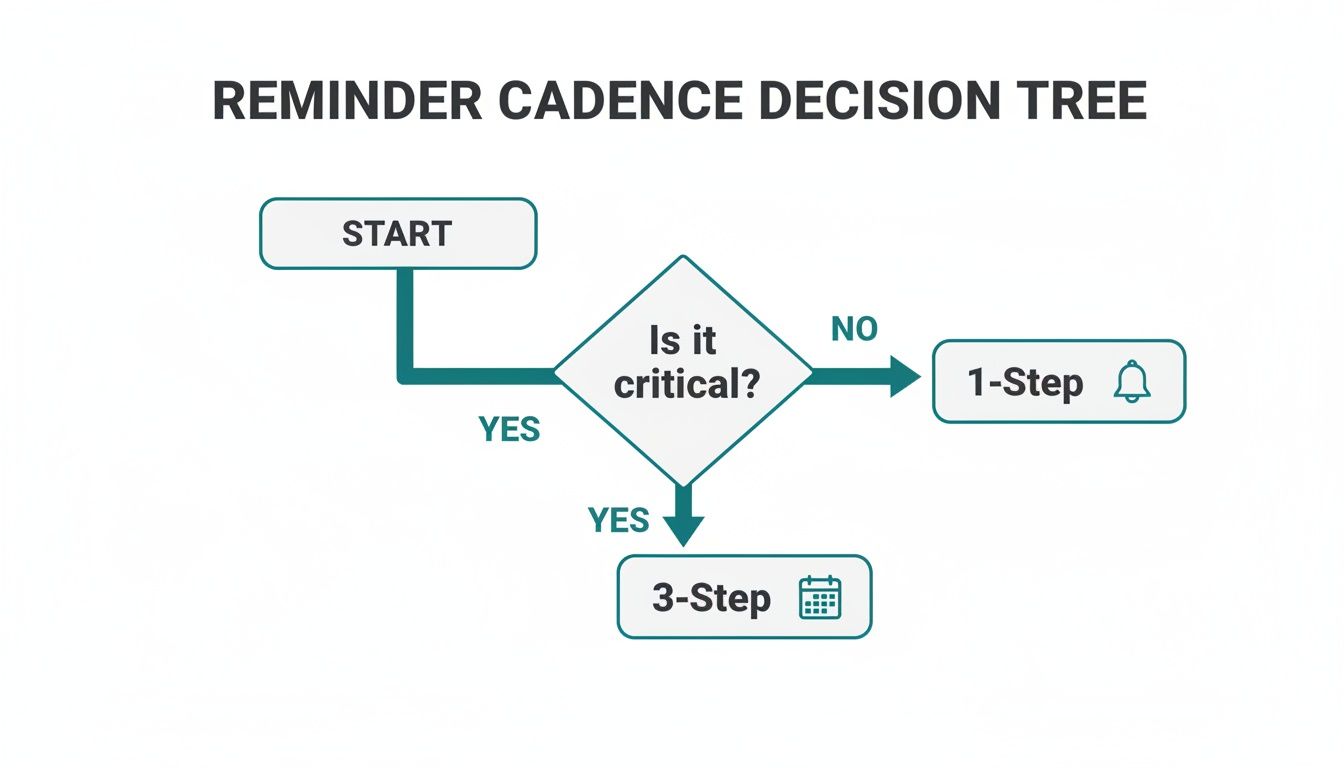
The decision tree makes it clear: the importance of the task should dictate how complex your reminder sequence is from the very beginning. When you combine that initial logic with flexible, user-friendly controls, you build a system that's both powerful and considerate.
Building intelligent systems like this is a huge part of modern productivity. If you want to dive deeper, check out our guide on what is workflow automation to see how these ideas can be applied on an even bigger scale.
Got Questions About Automated Email Reminders?
Once you start thinking about setting up automated reminders, a few questions usually pop up. It’s totally normal. Getting these sorted out is often the last step before you can really put these systems to work for you. Let’s walk through some of the most common ones I hear.
How Can I Make My Reminders Not Sound So Robotic?
This is a big one. Nobody wants to get an email that sounds like it was written by a machine. The secret is to inject a bit of your own personality and write like you talk.
Always, always use the person's name. And be specific about the event or task you’re reminding them about. A simple shift in language can make a world of difference. Instead of a cold, demanding "Payment is due," try something warmer like, "Just a friendly heads-up that your rent payment for the apartment is coming up." See the difference? Adding a little flexibility, like "Let me know if you have any questions," also makes the whole thing feel more human and less like a demand.
Are Calendar Notifications Good Enough, or Do I Need a Dedicated Tool?
Look, your phone or desktop calendar is great for your appointments. But the second another person is involved, they start to fall short. They just don't have the customization, tracking, or communication features you need for things like client deadlines or team tasks.
This is where dedicated tools really shine. They're built specifically for this kind of communication. With them, you can:
- Build out a multi-step email sequence for an important deadline.
- Create reusable templates you can tweak for different situations.
- Send reminders to anyone with an email address, not just people on your calendar.
- Get flexible controls, like the ability to pause or skip a reminder series.
Think of it this way: calendar alerts are for managing your own time. Dedicated reminder apps are for automating communication with others.
What’s the Right Number of Reminders to Send?
Finding the sweet spot here is key. Send too many, and you’ll just annoy people into ignoring you. Send too few, and deadlines get missed. It really depends on how critical the task is.
For something really important, a three-step sequence is a pretty solid rule of thumb. Maybe one week before, one day before, and on the day of the deadline. But for a less critical, routine thing like a weekly report? A single reminder 24 hours ahead of time is usually plenty.
The goal is to give a helpful nudge without creating inbox fatigue. If you can, giving the recipient control over the frequency is the gold standard—that way, they get exactly what they need.
Can I Use Auto Reminders for My Own Personal Goals?
Absolutely! This is one of my favorite ways to use them. An auto email reminder can be an incredibly powerful tool for building good habits. Sometimes, that structured, consistent email popping into your inbox is the exact kick you need to stay on track.
You could set up a daily email to practice Spanish for 15 minutes. Or one that goes out every Monday, Wednesday, and Friday to remind you to hit the gym. Or even a Sunday evening prompt to plan out your week. It's a surprisingly effective way to hold yourself accountable.
Ready to stop chasing people down and let automation handle the nagging? Recurrr is the simple, "invisible tool" that makes sending recurring email reminders a breeze. You can get it set up in minutes and get back to focusing on what really matters. Start automating for free with Recurrr.