

Auto text reminders are exactly what they sound like: scheduled SMS messages that go out automatically. They're a simple concept, but their power lies in cutting through the digital noise to make sure important info actually gets seen—without you having to lift a finger. Think of them as a powerful productivity hack for anyone juggling a busy schedule, whether you're a professional, running a team, or just managing a household.
Why Auto Text Reminders Are Your Secret Productivity Weapon
 We're all drowning in notifications. App alerts, social media pings, and an email inbox that never sleeps. But one message format still manages to break through the clutter every single time: a simple text.
When your phone buzzes with an SMS, you almost always look. That immediacy is what makes automated text reminders such a game-changer. Unlike an email that might sit unread for hours (or even days), a text feels urgent and personal.
This isn't just a feeling; the numbers back it up. SMS open rates consistently hit 98%, often within minutes. Compare that to the average email open rate of 20-30%, and it's obvious why so many professionals are turning to these tools. In fact, some automated SMS campaigns have been shown to generate 18% of revenue from just 9% of sends, blowing traditional methods out of the water.
Email vs Auto Text Reminders At a Glance
It's easy to see why SMS reminders often win out for timely communication. Here’s a quick breakdown:
| Metric | Auto Text Reminders (SMS) | Email Reminders |
|---|---|---|
| Average Open Rate | 98% | 20-30% |
| Time to Open | Within 3 minutes | Hours, or even days |
| Visibility | High (push notifications) | Low (lost in a crowded inbox) |
| Character Limit | 160 characters (concise) | No limit (can be lengthy) |
| Best For | Urgent, time-sensitive info | Detailed, less urgent updates |
While email still has its place, for a message that needs to be seen now, nothing beats a text.
More Than Just Another App To Manage
I get it—the last thing anyone needs is another complicated system to learn. But the beauty of auto text reminders is their simplicity. They aren't meant to replace your project management tool or your calendar.
Instead, they're a "set-it-and-forget-it" solution that works in the background. Here’s why they're so effective:
- They're Direct: Texts land on a person's most-used device, completely bypassing the digital chaos of other platforms.
- They Get a Response: The personal, one-to-one nature of SMS leads to faster and more reliable engagement than email ever could.
- They Save You Time: Automation removes the mental load of manual follow-ups, freeing you up to focus on what actually matters.
- They're Reliable: Critical information gets delivered and seen, which means fewer missed appointments, late payments, and forgotten deadlines.
The Real-World Impact
The uses for automated texts are practically endless, touching almost every part of professional and personal life. A property manager can schedule rent reminders to curb late payments. A freelancer can send automated nudges about an overdue invoice to get paid on time.
For businesses, these reminders are crucial for making sure important client touchpoints don't fall through the cracks. In a busy sales pipeline, for example, they can prevent follow-ups from being forgotten and keep deals moving forward. It's a small change that can lead to massive improvements in cash flow and client relationships. You can even explore other kinds of https://recurrr.com/articles/auto-reminders to see what's possible.
The true value of automated reminders isn't the tech itself—it's the consistency it creates. It’s about building a reliable system that works for you, even when you’re not actively thinking about it.
Getting Your Automated Reminders Set Up Right
Jumping straight into sending automated text reminders without a plan is like building a house with no foundation. It might seem quick, but it's bound to cause problems down the road. Before you even think about scheduling your first message, a little prep work goes a long way. Trust me, it ensures your system is effective, respectful, and, most importantly, legal.
This groundwork isn’t complicated, but it is critical. It really boils down to two things: knowing the rules of the road and picking the right tool for the job. Get these right from the start, and you'll save yourself a ton of headaches and build a reminder system that people actually appreciate.
Navigating the Rules of Engagement
The first, and most important, piece of this puzzle is compliance. You can't just send automated texts to anyone. In the United States, the big one to know is the Telephone Consumer Protection Act (TCPA). It sets some pretty strict rules to keep consumers from getting spammed.
The main takeaway is simple: you absolutely must have explicit, written consent before sending automated texts. This isn't just a friendly suggestion; it's a legal requirement. It's all about making sure you’re only messaging people who have clearly asked to hear from you.
A simple "Yes" in a text or a checked box on a form is usually enough, but the request has to be crystal clear. You can't assume consent or bury it in the fine print. When in doubt, be transparent.
Getting this opt-in doesn't have to feel like a legal chore. It can be a natural part of your workflow.
- For appointment-based businesses: Just add a checkbox to your booking form that says, "I agree to receive text reminders for my upcoming appointments." Simple.
- For invoicing: Include a line in your client agreement like, "Would you like to receive SMS payment reminders? If so, please provide your mobile number."
- For personal use: Even for household stuff, a quick text like, "Hey, I'm setting up auto-reminders for our weekly chores. Is it okay if I add you?" does the trick.
And always, always provide an easy way to opt out, like replying with "STOP." It’s not just a best practice; it's a required sign of respect for their inbox.
Choosing the Right Tool for the Job
Once you've got the compliance side sorted, it's time to pick your software. The market is flooded with options, from massive marketing platforms to tiny, focused apps. Don't get overwhelmed. Just think about what you actually need.
There’s no reason to pay for a complex, expensive system if all you want to do is send a few recurring payment reminders. You need a tool that fits your specific workflow, not one that tries to do everything. And sometimes, inspiration for the right tool can come from unexpected places; resources like the best ADHD planner apps often highlight the power of simplicity and focus, which is exactly what you should look for.
Ask yourself these key questions:
- What’s my main goal here? Am I reminding clients of appointments, chasing invoices, or organizing team deadlines?
- Does it need to talk to my other tools? Do you need it to hook into your calendar, CRM, or accounting software?
- How many messages am I sending? Are we talking ten reminders a month or a thousand?
- How easy is it to use? Can I set up a new reminder in a minute or two without needing a user manual?
For a lot of busy professionals and small teams, a big platform is total overkill. The most powerful solution is often a "hidden gem" that does one thing exceptionally well.
A tool like Recurrr is a great example of this. It's not trying to be your all-in-one project management app or a habit tracker. It’s a small productivity hack you can use alongside your other tools to handle simple, repetitive communication. It's perfect for the freelancer who needs to send the same 10 invoice reminders every month, or the property manager who sends rent reminders to all tenants on the 1st. It automates one specific, nagging task without bloating your tech stack with features you'll never use. This focused approach is a huge part of building a sustainable system. If you want to dive deeper into this idea, it’s worth learning more about what workflow automation is and how it can strip complexity out of your day.
Crafting Reminder Messages That Actually Get Results
We've all received them. The vague, unhelpful text message that gets ignored or deleted in seconds. The difference between a great reminder and digital junk often boils down to a few simple words.
With SMS, you're working with limited space and even less attention. A poorly worded auto text reminder is just noise. But a well-crafted one? That's what drives action, slashes no-shows, and quietly builds trust with your clients or team. The secret isn't fancy language—it's about being direct, clear, and human.
The Anatomy of a Perfect Reminder Message
To make your auto text reminders consistently effective, they need to answer three basic questions right away. Think of it as a simple formula for getting the job done: Who, What, and How.
- Who: Always lead with who you are. A text from an unknown number is instantly suspicious. Starting with your business or name provides immediate context and tells the person, "Hey, this is legit."
- What: Cut straight to the chase. What’s this about? An appointment time, an overdue invoice, a project deadline? Be specific. Vague messages just create confusion and force the other person to do the work.
- How: Give a clear, simple call-to-action (CTA). Tell them exactly what to do next. That could be confirming with a "YES," clicking a payment link, or just acknowledging the message.
Nailing these three elements in every automated text removes all the guesswork and makes it dead simple for people to respond.
Ready-to-Use Reminder Templates That Work
Theory is one thing, but seeing it in practice is another. Here are a few battle-tested templates you can swipe and adapt for your own use. You'll notice each one follows that same "Who, What, How" structure with a friendly, professional tone.
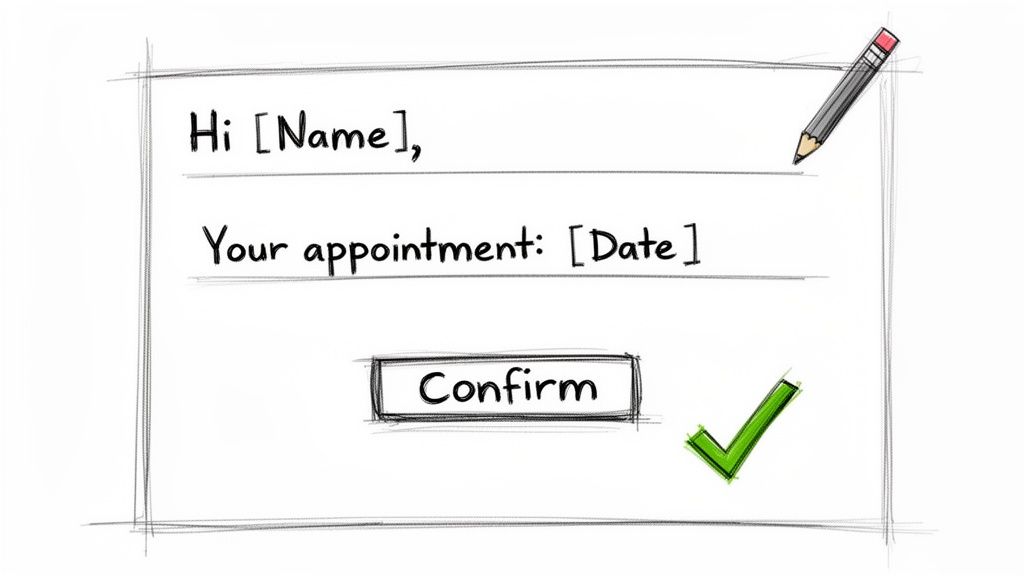
For Appointment Confirmations:
"Hi [Name], this is a reminder from [Your Business] about your appointment on [Date] at [Time]. Please reply with YES to confirm or call us at [Phone Number] to reschedule. Thanks!"
This one is a classic for a reason. It’s personal, direct, and gives two simple options. By making confirmation a one-word task, you drastically lower the barrier to responding. It's no wonder that in healthcare, these kinds of automated reminders have been shown to cut no-show rates by up to 38%.
For Overdue Invoice Nudges:
"Hi [Name], just a friendly reminder from [Your Name/Company] that invoice #[Invoice Number] for $[Amount] is now past due. You can pay securely here: [Link]. Let us know if you have any questions."
The magic word here is "friendly." It keeps the tone helpful instead of accusatory. The direct payment link is also crucial—it removes friction and lets the client settle up right on the spot.
For Team Project Deadlines:
"Team reminder: The first draft of the [Project Name] report is due by EOD this Friday, [Date]. Please make sure your section is submitted in the shared drive. Let's finish strong!"
For internal teams, this approach works because it’s concise and rallies everyone around a shared goal. It feels like a supportive nudge, not a micromanaging command.
Making Automated Messages Feel Human
Automation should save you time, but your communication still needs to build connection. The goal is to make your scheduled texts feel less like a robot and more like a helpful assistant. The easiest way to do that? Personalization.
Most reminder software lets you use dynamic fields (or placeholders) like [Name], [Date], or [Invoice Number]. These automatically pull specific details from your contact list, calendar, or CRM. It's a simple trick, but it's incredibly powerful.
Think about it: a message starting with "Hi Jessica," feels infinitely more personal than "Dear client." That small touch shows you see them as an individual, not just a number on a spreadsheet.
This little bit of personalization has a huge impact on engagement. It’s a tiny detail that completely changes how your auto text reminders are perceived, turning a cold notification into a warm, personal touchpoint. At the end of the day, it's all about empathy—putting yourself in their shoes and giving them exactly the information they need, when they need it.
Mastering the Art of Timing and Frequency
Sending a reminder at the wrong moment can be just as ineffective as not sending one at all. Think about it: an invoice reminder sent a month early will get ignored, while an appointment reminder sent two minutes beforehand is completely useless.
The real art is finding that sweet spot where your message lands with maximum impact—feeling genuinely helpful, not intrusive.
A perfect example is a dentist appointment reminder. Sending it 24 hours in advance is the gold standard. This gives the person just enough time to shuffle their schedule if they need to, but not so much time that they'll forget all over again. It’s a single, well-placed nudge that shows you respect their time.
On the other hand, reminding someone about an upcoming payment needs a totally different rhythm. A multi-step sequence, what we call a cadence, is far more effective. It gently guides the person toward the deadline without creating a sense of pressure.
Building Your Reminder Cadence
A reminder cadence is simply a planned sequence of messages designed to hit a specific goal. Instead of firing off random, one-off texts, you’re building a small, automated workflow that does the nagging for you.
Here’s a real-world example for an invoice due on the 30th of the month:
- Message 1 (3 Days Before): A friendly heads-up. "Hi [Name], just a quick reminder that invoice #123 is due this Friday. Thanks!"
- Message 2 (On the Due Date): A clear and direct prompt. "Hi [Name], your payment for invoice #123 is due today. You can pay here: [Link]."
- Message 3 (3 Days After): A polite follow-up. "Hi [Name], a gentle reminder that invoice #123 is now past due. Please let us know if you have any questions."
This approach completely avoids message fatigue. By spacing out the communication, you provide value at each step instead of just bombarding them with annoying, repetitive texts. This idea of spaced-out information isn't just for payments; you can learn more about how spaced repetition helps with memory and learning in our other article.
Strategic Timing for Maximum Impact
The timing of your automated texts depends entirely on the context. There isn't a single "best time" to send a text, but there are definitely strategic windows that consistently deliver better results.
| Reminder Type | Recommended Timing | Why It Works |
|---|---|---|
| Appointment Confirmation | 24-48 hours before | Gives ample time for rescheduling and minimizes no-shows. Studies show this can reduce missed appointments by up to 38%. |
| Event or Webinar | 1 day before & 1 hour before | The first message builds anticipation, and the second captures attention right when they need to log on or leave. |
| Invoice/Payment Due | 3 days before, on the due date, & 3 days after | Creates a gentle, persistent follow-up sequence that keeps the payment top-of-mind without being aggressive. |
| Team Project Deadlines | 1 week before & 1 day before | Provides a long-range heads-up for planning and a final nudge to ensure last-minute tasks are completed. |
The goal is to make your reminder arrive at the exact moment of relevance. It should feel like a helpful assistant whispering in their ear, not a loud alarm clock going off at the wrong time.
This isn't just about convenience; it's a powerful way to drive results. Recent SMS marketing stats show automated drip campaigns are surging in popularity, all because they’re fueled by smart personalization and behavior-based timing.
For local services, well-timed reminders and follow-ups can hit 25-35% conversion rates. This just proves that when you send your message is every bit as important as what it says. You can read more about why text messaging continues to outperform other channels on projectbroadcast.com. When you get the timing right, you turn a simple notification into a powerful tool for action.
All the theory and templates are great, but the real fun begins when you actually put it all together. Let's get our hands dirty and build your very first auto text reminder workflow from scratch using a scenario I see all the time.
Picture this: you're running a small business and every month you have to send out recurring invoices. Chasing those payments manually is a soul-crushing chore you dread. This is the absolute perfect job for automation. You can set it up once and free yourself up to do the work that actually makes you money.
When you boil it down, setting up any auto-reminder workflow is a simple, three-part dance: build your list, write your message, and set the schedule.
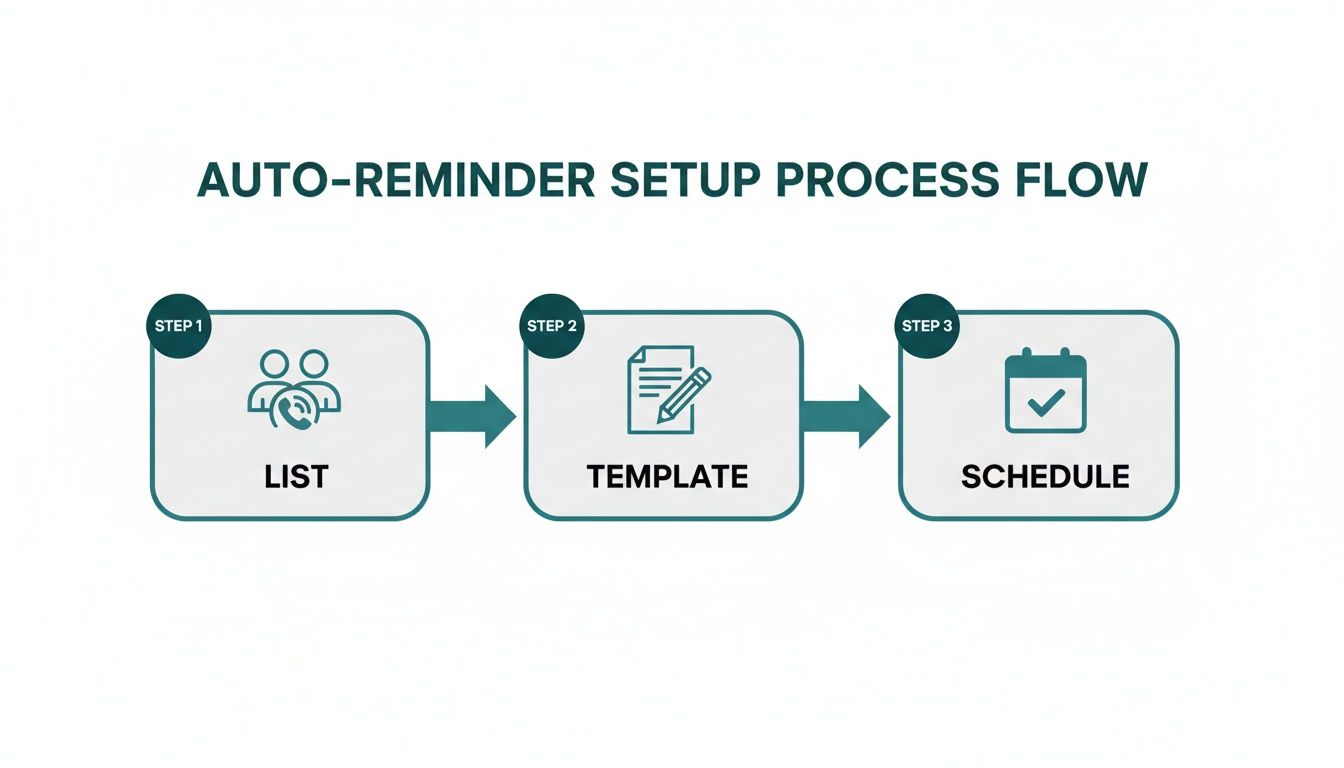
This is the fundamental blueprint. Once you get this down, you can turn just about any repetitive reminder into a reliable system that runs on its own.
Start With Your Contact Foundation
First up, your automation tool needs to know who it’s texting. Most reminder apps let you import contacts, usually from a simple CSV file or by linking directly to a Google Sheet. For our invoice example, you’d just need a spreadsheet with a few key columns:
- First Name: So you can personalize the message with a field like
[Name]. - Phone Number: The obvious destination for your text.
- Invoice Due Date: This is a dynamic field,
[DueDate], that will trigger the reminder. - Invoice Amount: Another useful field,
[Amount], for clarity.
Keeping this data clean and organized is the secret sauce. A well-structured contact list is the engine that drives the entire workflow.
Craft a Reusable Message Template
Next, it's time to write the actual text message. But instead of typing it out for every single person, you'll create a template using those dynamic fields from your list. This is how you get personalized messages without any of the manual work.
Borrowing from the templates we talked about earlier, a solid invoice reminder could look something like this:
Hi
[Name], just a friendly reminder that your invoice for[Amount]is due on[DueDate]. You can view and pay it here: [PaymentLink]. Thanks!
See how that works? It's personal, direct, and has a clear call to action. You write it one time, and the software plugs in the right name, amount, and date for every single person on your list.
Define Your Triggers and Schedule
This is where the magic really kicks in. You need to tell the system when to send the message. Instead of picking a fixed date, you’ll set a trigger based on that [DueDate] field we created in the contact list.
A smart schedule for chasing invoices isn't just one text—it's a multi-step cadence.
- First Reminder: Send a gentle nudge 3 days before the
[DueDate]. - Second Reminder: Send another text on the morning of the
[DueDate]. - Final Reminder (Optional): Send a follow-up 2 days after the
[DueDate]only if the invoice is still unpaid.
By setting up these simple rules, you’ve built a completely hands-off system. The app will now automatically send the right message to the right person at the right time, every single month, without you lifting a finger.
The Power of Simple Integrations
Here's where a small productivity hack becomes an absolute game-changer. Many of the best reminder apps, like Recurrr, can connect with the tools you're already using every day, like Google Calendar or Sheets. This creates a beautifully seamless flow.
For instance, you could set up a workflow where adding a new client to your Google Sheet automatically enrolls them in your reminder sequence. You'd never have to manually update a contact list again. This is just one of the benefits you'll find when you look into the best workflow automation tools out there.
This isn't about adding another complicated piece of software to your plate. It's about finding an invisible tool that works quietly in the background, handling the tedious follow-ups so you can focus on what matters. You’ve just turned a nagging monthly task into a reliable, automated system that saves time and cuts down on stress.
Measuring Success and Optimizing Your Strategy
So you've got your auto text reminders running. Job done, right? Not quite.
Sending automated texts isn't a "set it and forget it" game. To really squeeze the most value out of your efforts, you need to think of it as "set it and refine it." Keeping an eye on a few key numbers will show you exactly what's working and what could use a little nudge in the right direction.
Let's start with the basics: delivery rate, click-through rate (CTR), and your conversion rate. A high delivery rate is a good sign that your contact list is healthy and up-to-date. If you see a strong CTR on any links you include, you know your message is hitting the mark. But the real proof is in the conversion rate—are people actually showing up for their appointments or paying their invoices? That’s the number that tells you if your reminders are driving real-world results.
Fine-Tuning Your Approach with A/B Testing
Once you have a feel for your baseline numbers, it's time to start experimenting. This is where A/B testing, also called split testing, becomes your secret weapon. It’s a straightforward way to pit two versions of a message against each other to see which one performs better.
You can test just about anything to see if it boosts your results. For example:
- Message Copy: Does a friendly, casual tone get more clicks than a formal, direct one?
- Send Times: Will a reminder sent at 8 AM work better than one that goes out at 5 PM?
- Calls-to-Action: Try testing "Pay Your Bill Now" against a softer "View Your Invoice."
By making small, deliberate changes and measuring what happens, you can systematically make your auto text reminders more and more effective. Even a tiny lift in your response rate can make a huge difference over time.
Don't forget to watch your opt-out rate. If you see a sudden jump in people unsubscribing, that’s a massive red flag. It could mean you're sending texts too often or the content just isn't relevant anymore. Treat this feedback as gold and adjust your strategy immediately.
There's a reason 63% of businesses globally use texting for scheduling and reminders: it flat-out works. With automated SMS driving serious revenue and boasting 20-35% click-through rates for things like cart recovery, optimizing your strategy is all about maximizing a channel that’s already proven to deliver a high return. For a deeper dive, you can find more insights on text marketing performance on txtcartapp.com.
Questions You Might Have About Auto Text Reminders
Even with a solid plan in hand, it's natural to have a few questions when you're just starting out with automated texts. Let's tackle some of the most common ones I hear so you can get going with confidence.
Are Auto Text Reminders Actually Legal for My Business?
Yes, absolutely—as long as you play by the rules. The big one in the U.S. is the Telephone Consumer Protection Act (TCPA). The most important thing to remember is that you need explicit written consent before you send anyone automated texts.
This isn't as complicated as it sounds. It just means they have to clearly agree to receive messages from you. This is usually done by checking a box on a signup form or texting a keyword like "YES" to your number. You also have to give them an easy way to opt out anytime, like by replying "STOP."
What's the Best Time of Day to Send a Reminder?
This really depends on why you're sending the text. For appointments, the gold standard is 24 hours in advance, sent during normal business hours. That gives people plenty of time to see it and reschedule if something has come up.
If it's a payment reminder, a message sent mid-morning a few days before the due date usually works wonders. The key is to avoid super early morning or late-night texts. You want to be helpful, not a nuisance that wakes someone up.
A great reminder feels like a helpful tap on the shoulder at just the right moment. The best way to find that moment for your specific audience is to test different sending times and see what drives the best response.
Can I Just Use My Regular Phone for This?
While you could manually send reminders one-by-one from your smartphone, you can't set up true, scheduled automation. A regular phone just doesn't have the built-in horsepower to send a pre-written message at a specific future date and time all on its own.
This is where a dedicated service comes in. It lets you schedule messages in advance, personalize them with details like a person's name using tags like [Name], and automatically handle things like opt-outs. For any kind of professional or business use, those features are non-negotiable.
Ready to stop chasing people and start automating your reminders? Recurrr is the simple, "invisible tool" that handles your recurring messages so you can focus on what truly matters. Start automating your reminders today.