

Think of an automatic email reminder as your own personal assistant—one who has a flawless memory and never takes a day off. In short, they are messages you schedule ahead of time to send on a specific date, acting as a perfect digital nudge for yourself or someone else.
Understanding the Power of Automated Nudges
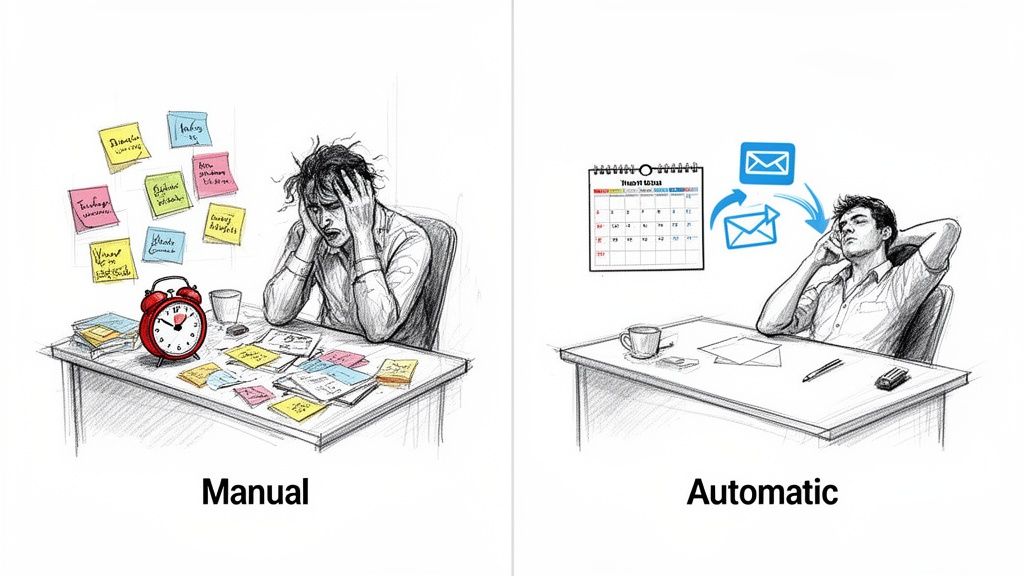
At its heart, an automatic email reminder is a simple "set it and forget it" tool. You write an email just once, tell a system when to send it out, and that's it. The system handles the rest. This one small action lifts the massive mental burden of remembering all those little things, from paying bills on time to following up with a new client after a big meeting.
Instead of your brain being cluttered with an endless to-do list, you're delegating the simple act of remembering to technology. This frees up so much mental energy, letting you focus on the work that actually matters, not the logistics of remembering to do the work.
From Manual Effort to Autopilot
The leap from manual follow-ups to automated ones is huge. One requires your constant attention and energy, while the other just hums along quietly in the background, making sure nothing ever slips through the cracks. It's like the difference between grabbing a watering can every single day versus installing a simple drip irrigation system that takes care of your garden for you.
When you apply this to a business, the impact is undeniable. There's a reason automated email workflows are a cornerstone of modern business communication: they get incredible results. Even though automated messages make up just 2% of all emails sent, they are responsible for generating over 41% of all email orders. That's a staggering return.
This really drives home a key point: automation handles repetitive, critical communication with a level of reliability that a human just can't match day in and day out.
The real magic of automatic reminders isn't just about saving time; it's about buying back mental peace and ensuring consistency.
A Clear Comparison
Let's lay out the practical differences side-by-side. Trying to rely on your own memory, a calendar alert you might dismiss, or a mess of sticky notes is just asking for trouble, especially when things get hectic. An automated system, on the other hand, is built for precision. The goal is to shift from a reactive state of hoping you remember to a proactive one of knowing it's handled. For a deeper dive into this idea, check out our guide on workflow automation.
To see just how different the two approaches are, take a look at this table.
Manual Follow-Ups vs Automatic Email Reminders
| Aspect | Manual Follow-Up | Automatic Email Reminder |
|---|---|---|
| Reliability | Depends on memory; prone to error and forgetfulness. | Consistent and reliable; sends on schedule every time. |
| Efficiency | Time-consuming; requires repeated manual action. | Set it once and it runs indefinitely, saving hours. |
| Mental Load | Adds to mental clutter and stress. | Frees up mental space for more important tasks. |
| Scalability | Difficult to manage as tasks and contacts increase. | Easily handles hundreds of reminders without extra effort. |
As you can see, automation isn't just a minor improvement; it's a fundamental change in how you manage your commitments and communication, making your workflow more robust and scalable.
What Are the Real-World Benefits of Automating Your Reminders?
Let's be honest, setting up automatic reminders isn't just about ticking things off a to-do list. It's about fundamentally changing how you work and think. The biggest, most immediate win? You get your focus back.
When you're not mentally juggling a dozen follow-ups, invoice dates, and deadlines, your brain is free to do the deep, meaningful work that actually matters.
Think of a freelance writer who used to spend hours chasing late payments. Now, their reminder system does the nagging for them. All that mental energy that was wasted on awkward money conversations can be poured into their next creative piece. This is the magic of automatic email reminders—they handle the boring stuff so you can be brilliant at the important stuff.
This shift clears out so much mental clutter. Every manual reminder you have to remember to send is like a little weight on your mind. Automating them lifts that weight, giving you a sense of clarity and control that cuts down on daily stress and keeps burnout at bay.
Build a Reputation for Reliability (Without Trying So Hard)
Beyond your own sanity, automation helps you build a rock-solid reputation. When clients, coworkers, and your team get timely updates and follow-ups from you like clockwork, they see you as organized and dependable. It’s not about being a robot; it’s about being consistently professional.
A project manager who automates weekly check-ins keeps everyone on the same page without having to constantly poke people. The system becomes the bad guy, preserving professional relationships that can get strained by those awkward "just checking in..." messages.
An automatic reminder system is like a silent partner working in the background. It makes sure nothing slips through the cracks and quietly boosts your professional credibility, all without you lifting a finger.
This kind of consistency builds trust. People learn what to expect from you, and that's the bedrock of any solid working relationship. It turns what was once a communication chore into a smooth, reliable process.
Finally Get in Control and Cut Down on Stress
When you add it all up, the real payoff is a powerful sense of control. Instead of constantly reacting to things you forgot or deadlines that sneak up on you, you're proactively managing everything on your plate. And that feeling of being on top of things does wonders for your well-being.
Just look at how it helps in a few key areas:
- Financial Peace of Mind: Put your invoice reminders on autopilot to get paid on time without the awkward manual follow-ups. This smooths out your cash flow and dials down the financial anxiety.
- Keep Projects Moving: Use automated milestone alerts and deadline pings to keep projects from stalling. The whole team stays in sync, and you avoid those last-minute scrambles. You can learn more about how to streamline your workflow with task automation in our in-depth guide.
- Get Your Personal Life Organized: Use it for the little things, too. Automate reminders to pay bills or schedule appointments, and you’ll free up your evenings and weekends from all that life admin.
By offloading these repetitive but essential tasks, you're creating a buffer against the chaos of a busy life. It’s a simple change, but it doesn't just make you more productive—it makes your entire day feel calmer and more predictable.
Practical Ways to Use Automatic Reminders Every Day
The real magic of automatic email reminders isn't just in the concept—it's what happens when you actually put them to work. This isn't some abstract theory; it's a super practical tool that solves real, everyday headaches for pretty much everyone. Whether you're a freelancer chasing down invoices or a student trying to juggle deadlines, automation is like having a reliable safety net that catches all the little things that might otherwise slip through.
Let's dive into a few real-world scenarios where setting up a simple automated message can make a massive difference. Think of these as blueprints you can use to get back some control and cut down on the friction in your daily life.
For Busy Professionals and Teams
In any fast-moving workplace, it's amazing how quickly communication can get lost in the shuffle. Automatic reminders are that constant, gentle nudge that keeps projects and people on the same page, all without you having to micromanage everything.
- Client Follow-Ups: Set up a reminder to check in with a new client a week after your first meeting. It’s a small touch that shows you’re on top of things and helps build a strong relationship right from the get-go.
- Project Milestones: Create recurring emails that ping your team a few days before a big deadline. This is a simple way to keep everyone aligned and accountable, heading off those last-minute scrambles.
- Meeting Preparation: Send an automated email with the agenda and any important documents 24 hours before a big meeting. If you need some inspiration, check out these different meeting reminder email samples to find a style that works for you.
This diagram breaks down how these small, automated actions snowball into bigger wins like better focus, greater reliability, and stronger professional connections.
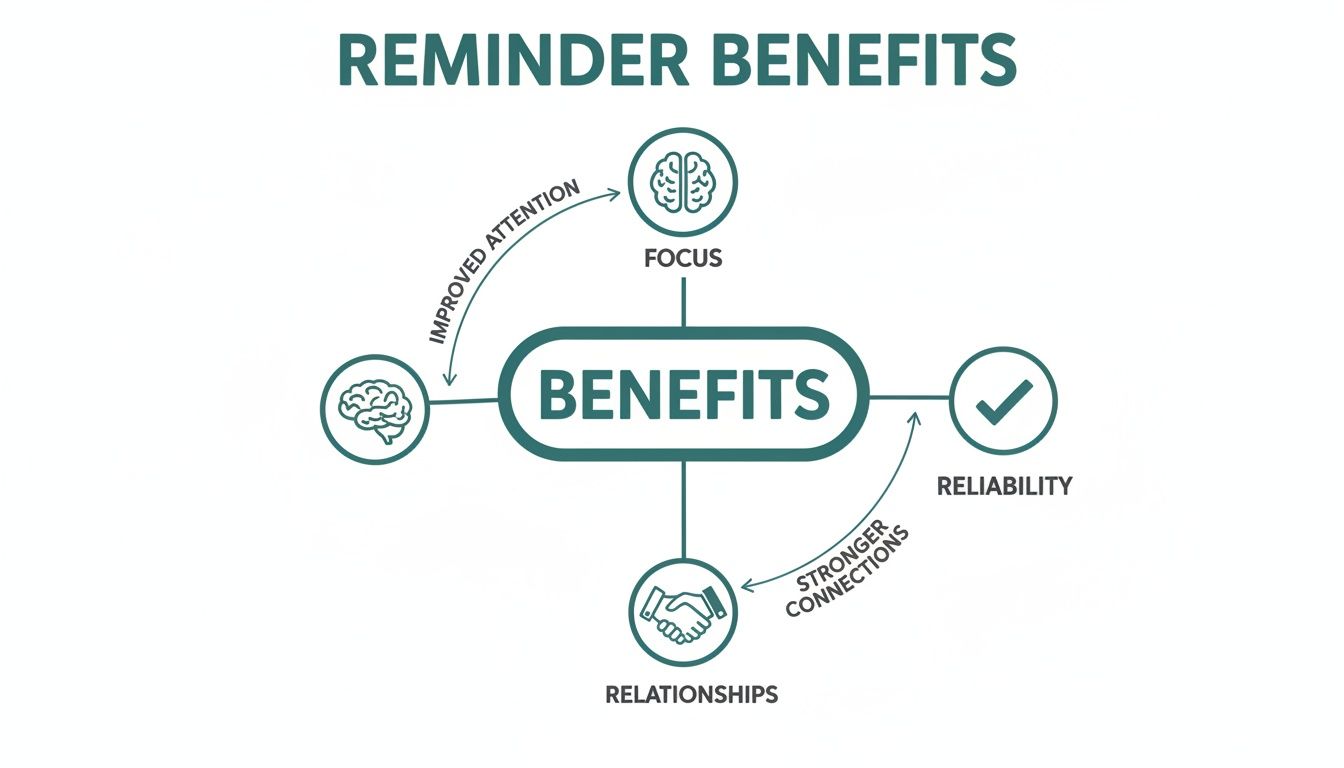
The key takeaway here is that automation isn't just about ticking boxes. It's about supporting the human side of work by making sure communication is consistent and crystal clear.
For Freelancers and Solopreneurs
When you're running the show yourself, you're not just the creative genius—you're also the accounts receivable department. Trust me, automating your payment and contract reminders is one of the most powerful moves you can make to stabilize your workflow and cash flow.
For a freelancer, an automated invoice reminder is more than a convenience; it's a tool for maintaining professional boundaries and ensuring you get paid on time without awkward conversations.
Think about these all-too-common freelance headaches that automation can solve in a snap:
- Invoice Reminders: Set up a polite reminder that goes out automatically the day an invoice becomes overdue. This one simple step can dramatically cut down on late payments.
- Contract Renewals: If you're on a retainer, schedule an email to go out 30 days before a contract is up. It’s the perfect, low-pressure way to get the renewal conversation started.
- Onboarding Nudges: Guide new clients through your process with a series of automated emails, gently reminding them about any forms or files you're waiting on.
For Personal Life and Education
Automation isn't just a work thing. Students can use it to stay on top of a crazy-demanding schedule, and really, anyone can use it to make household admin less of a chore.
- Assignment Deadlines: Students can schedule reminders for assignments a week before they're due, giving them plenty of time to get the work done without the last-minute panic.
- Study Schedules: Set up a recurring daily email that lays out your study topics for the day. It’s a great way to build a solid, consistent habit.
- Household Bills: Send yourself an automatic reminder a few days before rent or utility bills are due. It’s a five-minute setup that can save you a bundle in late fees.
These examples just scratch the surface of what automatic email reminders can do. And once you get the hang of it, you might find other email tasks you can automate, too. For example, learning how to automatically forward email from Outlook can be another game-changer for making sure important messages always end up in the right place.
How to Choose the Right Automatic Reminder Tool
Okay, so you're sold on the idea of automatic email reminders. That's the easy part. The next step is figuring out which tool to actually use, and that can feel a little overwhelming. The market is packed with everything from massive project management suites with a reminder function tacked on, to nimble, single-purpose apps.
The trick is to cut through the noise and find something that genuinely fits your needs without making your life more complicated.
You're looking for a few key things. Flexible scheduling is non-negotiable—you need to be able to set reminders for daily, weekly, or completely custom intervals. You also want to be able to personalize the messages. But most importantly, it has to be dead simple to use. If setting up a reminder takes more than a minute or two, it completely defeats the purpose.
The Hidden Gem vs. The All-In-One Giant
A lot of people's first instinct is to check if their existing project management tool, like Asana or Trello, can send reminders. And sure, they often can. But these features are usually an afterthought, buried deep in the settings and lacking the power you need for real automation.
This is where a little productivity hack comes in handy.
Instead of trying to force a bulky, do-everything platform to fit your needs, think about a "hidden gem" tool like Recurrr. It isn't a project manager or a habit tracker; it's an invisible tool, designed to do just one thing and do it exceptionally well: send automatic email reminders. This laser-focused approach makes it the perfect addition to your current workflow, not a clunky replacement for it.
You'll notice the interface of a dedicated tool is way cleaner, too. Just look at this screenshot from Recurrr:
This kind of minimalist design means you can fire off a new recurring email in seconds, without getting lost in a maze of menus.
The best tool isn't the one with the most features; it's the one that solves your specific problem with the least amount of friction.
Feature Comparison of Reminder Tool Types
So, how do you decide between a dedicated app and a feature buried inside a bigger suite? It really boils down to what you prioritize. Do you need a simple, powerful reminder system that just works, or a massive platform that does a little bit of everything? For most people, the simplicity of a dedicated tool delivers more value and is way easier to stick with over time.
To help you see the difference at a glance, here’s a quick comparison of how these two types of tools stack up.
| Feature | Dedicated Reminder Tool (e.g., Recurrr) | Feature within a Project Management Suite |
|---|---|---|
| Primary Focus | Excels at sending scheduled email reminders. | A small part of a much larger feature set. |
| Ease of Use | Simple, intuitive interface designed for one task. | Often buried in complex menus and settings. |
| Flexibility | High degree of control over scheduling and content. | Can be rigid and tied to project-specific rules. |
| Setup Time | Typically under five minutes to create a reminder. | May require navigating project boards and tasks. |
| Cost | Often more affordable with a clear pricing model. | Included in a more expensive subscription package. |
At the end of the day, a dedicated tool is built for the job, while a feature in a larger suite is often just a box they needed to check. If you're serious about automating reminders, the choice is pretty clear.
And if you want to dive deeper into the world of automation platforms, check out our guide on the best workflow automation tools.
Set Up Your First Automatic Reminder in Minutes
Theory is great, but let's get our hands dirty. The real magic of automatic email reminders happens when you actually put them to work. The best part? You can have your first one up and running in less time than it takes to make a coffee. No complicated setups, just a powerful result, right now.
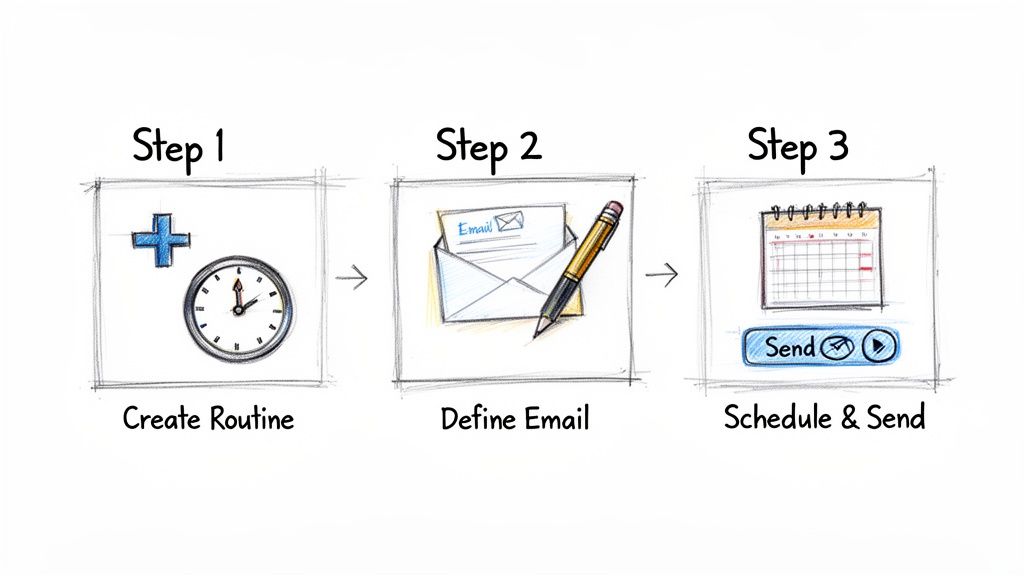
Let's walk through creating a simple, recurring reminder for a common task using a tool like Recurrr. The whole point is to be intuitive, getting you from an idea to a running automation in just a few clicks.
Step 1: Create Your Routine
First things first, you need a schedule. This is the "when." Think about the rhythm that makes sense for the task you're automating.
Is it a weekly project update that needs to hit inboxes every Friday morning? Or maybe a monthly invoice reminder that should land on the last day of the month? Good tools let you pick from common options or build a custom schedule that fits your workflow perfectly.
Step 2: Define Your Email Content
Next up, you write the actual email. This is your "what" and "who." You'll pop in the recipient's address, write a punchy subject line, and draft the message itself. The key is you only have to write it once, and it'll go out perfectly every single time.
A great automatic reminder is clear, to the point, and has all the necessary context. The goal is to craft a message so good you can truly "set it and forget it," knowing it will get the job done.
You can keep it dead simple or add a personal touch. For example, using a recipient's name can make an automated follow-up feel a lot more human and less robotic.
Step 3: Launch and Forget
Once the schedule is locked in and the email is written, the last step is the easiest: just hit "launch." That’s it. Your new automatic email reminder is live. It'll now run quietly in the background, sending your message on schedule without you having to lift another finger.
Here’s a quick template for a weekly project update email you could use today:
- To: team@example.com
- Subject: Weekly Project Update for [Project Name]
- Body: Hi Team, Just a friendly reminder to please submit your weekly progress updates for [Project Name] by end of day today. You can add your notes to our shared document here: [Link to Document]. Thanks!
This simple, three-step process is all it takes to offload a repetitive task and get some of your brainpower back.
Best Practices for Effective Email Reminders
Setting up an automated email reminder is one thing. Making sure it actually works is a whole other ball game. A poorly written reminder is just more noise in an already-crowded inbox, but a great one? That’s what gets people to act. The trick is to strike that perfect balance between being helpful and being a flat-out annoyance.
Your message needs to be so clear that someone can understand it at a glance. Ditch the long, rambling paragraphs and cut straight to the chase. The goal here is to give just enough information to get the job done, without overwhelming the reader. Always bet on a concise, scannable format.
Crafting Messages That Actually Connect
Your secret weapon here is personalization. An email that feels like it was written just for one person is miles more effective than a generic blast sent to everyone. Even a small touch, like using their first name, can make a huge difference in whether they pay attention.
But be careful not to go overboard with the automation. Firing off too many reminders too close together feels spammy and is a surefire way to get people to ignore you completely. Think about the right frequency. Is one reminder enough? Or does the situation call for a gentle nudge a few days before and then a final heads-up on the due date?
The best reminders are helpful, not harassing. They show respect for the recipient's time by being brief, clear, and relevant. That’s how you turn a simple automation into a positive experience.
Common Pitfalls to Sidestep
Even when you mean well, it’s surprisingly easy to make mistakes that completely undermine what you’re trying to do. Keeping an eye out for these common traps will help your automated reminders stay effective for the long haul.
- Forgetting to Update: Things change. The reminder you set up six months ago might be totally irrelevant now. It’s a good habit to periodically review your automated emails to make sure they're still accurate and necessary.
- Vague Subject Lines: Your subject line is the first thing people see. Make it count. Something specific like "Invoice #1234 Due Friday" is always better than a generic "Invoice Reminder."
- Ignoring New Tech: The tools for this stuff are always getting better. For instance, artificial intelligence is a game-changer for email. AI-generated subject lines can boost open rates by up to 22%, and AI-powered personalization has been shown to pump up click-through rates by 13%. Exploring these new tools can give your reminders an extra kick. You can dig into more stats about how AI is shaping email marketing on knak.com.
Your Questions About Email Reminders, Answered
Jumping into automated emails can bring up a few questions. It's totally normal. Here are some quick, straightforward answers to the things people usually ask when they start setting up automatic email reminders.
Can I Use These For My Personal Life, Too?
You bet. While they're a powerhouse for business, automatic reminders are just as handy for keeping your personal life on track. Think paying bills on time, never forgetting a birthday again, blocking out study time, or even just reminding yourself to take out the trash. Anything you need to remember, you can automate.
How Often Should I Send Reminder Emails?
This really, really depends on what you're reminding someone about. For a big project deadline, you might send a heads-up a week before, another three days out, and a final nudge on the day it's due. But for something like a weekly report, a single reminder on the morning it's needed is probably plenty.
The golden rule here is to be helpful, not a pest. Ask yourself: what's the absolute minimum number of reminders needed to get this done? Start there. You don't want to overwhelm people.
Will My Automated Reminders Sound Like a Robot Sent Them?
Only if you write them that way! The secret is personalization. Even simple things, like using someone's first name, make a huge difference and help an automated message feel more human. Write your email with a friendly, helpful tone, and it'll come across as a supportive nudge instead of a cold, robotic demand.
What's The Difference Between a Reminder and a Notification?
Good question. They seem similar, but there's a key distinction.
A notification is usually reactive. It’s a one-time alert about something that just happened, like "Your package has shipped." An automatic email reminder, on the other hand, is proactive. It's a message you schedule in advance to prompt an action that needs to happen in the future.
Ready to stop things from slipping through the cracks? Recurrr is the hidden gem that makes setting up powerful, recurring email reminders ridiculously simple. Get started for free and win back your focus today.